

A file is a tool used to remove material from parts using the many cutting teeth on its surface. Learning to use a file correctly is a basic prerequisite for fitting work. It’s one of the first topics in the Basic Manufacturing Processes lesson. The types of files are as follows:
Types of Files
File Types by Tooth Pattern
Single-cut files (for soft materials)
The teeth are arranged in a single row on the file. Single-cut files are suitable for removing material from soft materials (like aluminum).
Double-cut files (for hard materials)
The teeth are arranged in two crossing rows on the file. This way, the cutting effect is multiplied proportionally to the increase in the number of teeth. Double-cut files are suitable for removing material from hard materials like steel and cast iron.

Rasp-cut files (for wood and leather)
The teeth are individual pointed tips scattered in a certain pattern on the file. These files are suitable for rough material removal from wood and some plastic materials.
File Types by Cross-Section and Shape

Flat file

Triangular file

Barrette file (fish-back file)

Round file
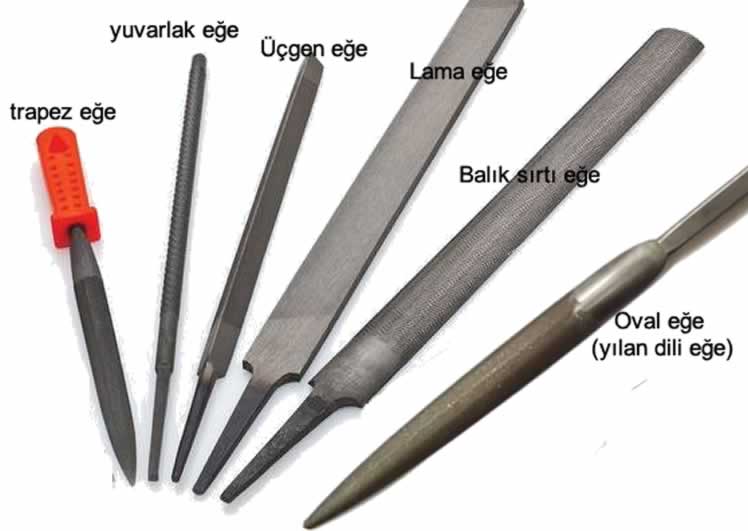
File Types by Application
Fitter’s files
Workshop files are used for filing operations in fitting and machining work. Files specified under TS 375 (Turkish Standard) are workshop files. These files are 100-350 mm long.

Watchmaker’s files
Watchmaker’s files: this is the file type with the greatest variety of cross-sections. Since watchmaker’s files are small and thin, they’re used in work like watchmaking and mold-making. These files are 50-100 mm long.

Chainsaw file
These have a round cross-section and are used for sharpening band saws. These files are 100-350 mm long.
Point file (feeler-gauge file)
A 0.8×8 mm rectangular-cross-section file, 90 mm long, either with or without an integral handle.
Saw-sharpening files
These have a triangular or flat cross-section, and are used for sharpening saw blade teeth. These files range from 100-350 mm long.
Tooth Cut Direction
Files can have a single-cut or double-cut tooth pattern; a double cut gives a smoother surface.
Effect of Tooth Coarseness
Coarse-tooth files remove material quickly, while fine-tooth files leave a more precise, smoother surface.
Variety of Cross-Section Shapes
Files are made in different cross-section shapes, such as flat, half-round, and triangular, to suit various surface and edge work.
Choosing a File
What should we pay attention to when choosing a file? There are certain criteria to consider when buying a file.
First, a file suited to the job at hand — meaning the file’s profile (square file, triangular file, etc.)
The file’s dimensions.
The type of material to be filed — considering properties like these is how a file is chosen.
Choosing a File by Size
Files are made in lengths of 4″ — 6″ … 16″, based on the length of their toothed section, or 80 mm – 450 mm. Tooth pitches (t) range from 2.5 mm to 0.25 mm, from the coarsest to the finest file. Files are selected from what’s on the market based on the specified dimensions, tooth pattern, and cross-section.
Choosing the Right File by Operation and Material Type
A fine-pitch file should be chosen for fine work or hard materials, and a coarse-pitch file for rough work or soft materials. For example, a coarse-pitch file is used for working brass, aluminum, or wood, while a fine-pitch file can be used when working steel.
Related Questions
Flat, half-round, and triangular cross-section files are the most commonly used file types.
Tooth cut direction, tooth coarseness, and cross-section shape are the main properties to consider when choosing a file.
Fine-tooth files are used to achieve a more precise and smoother surface.
Related Posts
 Types of Inspection Equipment and Their Use
  Parts of a Lathe, Illustrated
  How to Read a Caliper. Caliper Reading Explained
  How to Tap a Hole? How Is Tapping Done?
  What Is a Gauge. Why Is It Used?
  The Effect of Cutting Oils on Turning
  Making a Worm Wheel
  Steady Rests on a Lathe. Supporting a Workpiece on a Lathe