
Close Menu
  • MAKİNELER ve İMALAT
    • Tools & Equipment
    • Computer-Aided Drawing
    • CAD/CAM Education
    • CNC Machine Programming
    • Casting Technologies
    • Electrical & Electronics Technologies
    • Hydraulics & Pneumatics
    • Manufacturing Processes
    • Manufacturing Technologies
    • Occupational Safety
    • Mold & Die Design
    • Solid Modeling
    • Welding Technology
    • Machine Elements
    • Mechanical Trade Drawing
    • Materials Science
    • Automotive & Vehicle Technologies
    • Robotics Technologies
    • Health Technologies
    • Defense & Aerospace Technologies
    • Descriptive Geometry
    • Technical Drawing
    • Software & Hardware Technologies
    • Innovative Manufacturing Methods
  • TEKNOLOJİ ve YAŞAM
    • OTOMOBİLLER ve TAŞIT
      • Vehicle & Engine Knowledge
      • Safe Driving
      • Sürüş Destek Sistemleri
    • Genel Kültür
      • Movies & TV Shows
      • Görsel ve Grafik Sanat
      • Books & Literature
      • Music
      • Sports
      • History
      • History of Technology
    • GÜNDELİK YAŞAM TEKNOLOJİLERİ
    • Hobbies & Entertainment
    • Internet Technologies
    • Health
    • Mobile Technologies
Makine Eğitimi
  • Machines & Manufacturing
    Machine Elements
    Hydraulics & Pneumatics
    Technical Drawing
    Computer-Aided Design & Manufacturing
    Basic Manufacturing Processes
    Manufacturing Processes
    Industry Technologies
    Other Technical Courses
    Motion & Power Transmission
    Simple Machines
    Chains & Sprockets
    Shafts & Journals
    Gears
    Cams
    Couplings
    Belts & Pulleys
    Springs
    Bearings
    Keys
    Fastening Joining
    Retaining Rings
    Screws, Bolts & Nuts
    Cotter Pins
    Flanges
    Welding
    Rivets
    Pins & Bolts
    Washers
    Calculators
    Gear Ratio Calculator
    Spring Constant Calculator
    Belt Pulley Ratio Calculator
    Other Machine Elements
    Slides & Linear Guides
    Brakes
    Flywheels
    Clamps
    Shock Absorbers
    Gaskets & O-Rings
    Seals & Sealing Elements
    Hydraulics
    Introduction to Hydraulics & Principles
    Hydraulic Systems & Applications
    Accumulators
    Filters
    Motors
    Pumps
    Valves
    Pneumatics
    Introduction to Pneumatics & Principles
    Pneumatic Systems & Applications
    Pneumatic Circuit Components
    Valves
    Cylinders
    Silencers
    Motors
    Compressors
    Dryers
    Conditioning Units
    Common Topics & Maintenance
    Hydraulic & Pneumatic Maintenance
    Study Notes, Exams & Tests
    Technical Drawing
    Introduction to Technical Drawing
    Geometric Drawings
    Perspective & Projection
    Orthographic Views
    Dimensioning
    Sectioning
    Assembly & Detail Drawings
    Tolerances
    Surface Finish Symbols
    Mechanical Engineering Drawing
    Screws, Bolts & Nuts
    Pulley Drawings
    Gear Drawings
    Shafts & Journals
    Bearing Drawings
    Pins & Bolts
    Spring Drawings
    Welds in Technical Drawing
    Washers
    Cotter Pins
    Technical Drawing Exercises
    Mechanical Drawing Exercises
    Gear Exercises
    View Extraction Exercises
    Pulley Exercises
    Pin & Bolt Exercises
    Threaded Fastening Exercises
    Descriptive Geometry
    Computer-Aided Drawing
    AutoCAD Drawing Lessons
    Solid Modeling & Animation
    Solid Model Drawing Files
    Solid Model Assembly Examples
    Solid Model Drawing Lessons
    3D CAD Software Reviews
    Solid Modeling Exercises
    CNC Programming
    CAM
    Measurement & Inspection
    Dial Indicators
    Calipers
    Gauges
    Micrometers
    Materials Science
    Steels
    Cast Iron
    Aluminum
    Plastics
    Material Testing & Hardness Measurement
    Occupational Safety
    Workshop Safety
    Safety When Working With Electricity
    Machine Safety Rules
    Hand Operations
    Filing
    Marking
    Cutting Operations
    Reaming
    Tapping
    Threading With a Die
    Drill Bit Sharpening
    Working With Machines
    Basic Turning Operations
    Basic Milling Operations
    Shaper Machine
    Machining
    Turning
    Milling
    Grinding
    Innovative Manufacturing Methods
    EDM (Electrical Discharge Machining)
    Laser Machining
    Waterjet Machining
    3D Printing
    3D Scanners
    Welding
    Rolling
    Casting
    Mold & Die Design
    Mechanical & Hydraulic Presses
    Blanking & Piercing Dies
    Bending Dies
    Drawing Dies
    Plastic Injection Molds
    Extrusion Dies
    Compound Dies
    Progressive Dies
    Blow Molds
    Spinning Dies
    Spray Molds
    Manufacturing of Machine Parts
    Automotive & Vehicle Technologies
    Motor Vehicle Manufacturing
    Raw Material Production
    History of Technology
    Health & Medical Technologies
    Defense & Aerospace
    Robotics Technologies
    Software & Hardware Technologies
    Mechanics - Strength of Materials
    Physics Topics
  • Technology & Life
    Hobbies & Entertainment
    Sports
    Music
    Vehicle & Engine Knowledge
    Vehicle Maintenance & Repair
    Safe Driving
    Driver Assistance Systems
    History
    Movies & TV Shows
    Books & Literature
    Computers & Internet
    Computer Tips
    Software Reviews
    Hardware & Peripherals
    Practical & Safe Internet Use
    Visual & Graphic Art
    Mobile Technologies
    Travel
    Science
    Health
    First Aid Knowledge
    Everyday Technologies
Makine Eğitimi
Home»Vehicle Maintenance & Repair»How Is a Camshaft Checked?
29 August 2026

How Is a Camshaft Checked?

How Is a Camshaft Checked?

In this article, we’ll look at how a camshaft is checked when wear, scoring, or similar issues occur on the camshaft, the cam lobes, or the journals. We’ll cover details like what amount of wear is acceptable (within tolerance) when checking a camshaft, and what to do when wear exceeds these amounts.

How Is a Camshaft Checked?

If there’s abnormal wear, corrosion, pitting, or deep scoring on the lobes or journals, they should be replaced. So what happens if a camshaft wears too much? Excessive wear on the lobes and journals causes the valves not to open enough. Because the valves don’t open enough, the cylinders can’t draw in enough air-fuel mixture or air. The engine’s volumetric efficiency and power drop. This is also one of the reasons that increases the engine’s fuel consumption.

No load greater than valve spring pressure acts on the camshaft. For this reason, wear or ovality is rarely seen on the journals and their bearings. On a camshaft, ovality and wear values are determined by measuring the journal diameters.

how is a camshaft checked
Measuring a camshaft journal


The bearings the camshaft journals run in are made from a softer material than the journals. Because of this, camshaft journals wear less than the bearings. The camshaft is typically replaced once wear on the journals exceeds 0.02 mm.

checking camshaft wear with a micrometer
Checking camshaft wear

Lobe height is measured with a micrometer. If more than 10% wear is detected, the camshaft is replaced.

checking camshaft runout with a dial indicator
Checking runout on a camshaft

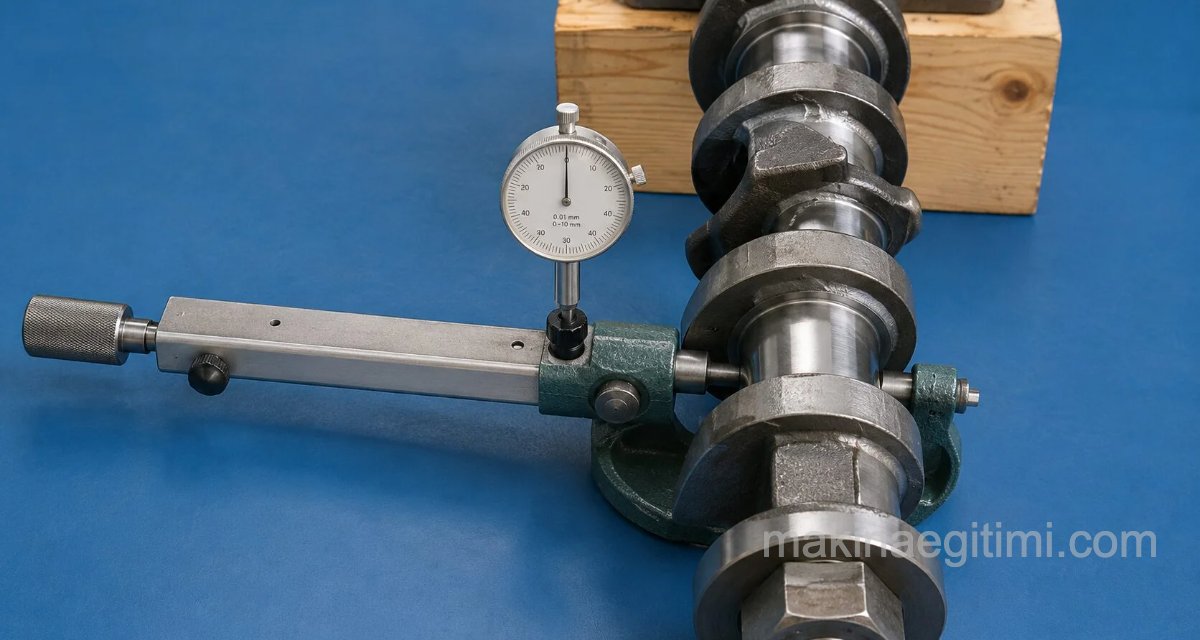
A dial indicator is used to check camshaft runout. The camshaft is placed on V-blocks. The dial indicator’s probe is brought into contact with the center journal. The camshaft is rotated one full turn and the runout is measured. If the runout exceeds 0.05, the camshaft is replaced.

camshaft electronic measurement and test device

There are also advanced electronic camshaft measurement and analysis devices that can perform many detailed analyses of a camshaft.

camshaft test and analysis software

The image above shows a screenshot from the measurement, test, and analysis-evaluation software for this kind of electronic analysis device, from software called Cam Analyzer.

In this article, we tried to explain how a camshaft is checked. We covered how the wear that can occur on the camshaft’s journals and lobes — shortened length, runout, and similar issues — can be checked with various measuring and inspection tools. We covered details like what happens if a camshaft wears, whether it damages the engine, and whether it increases fuel consumption. Below you can find some related articles. We hope to see you in our new articles. 

Visual Wear Check


Visible pitting or scoring on the camshaft’s lobe surfaces is a clear sign of wear.

Measuring with a Micrometer


Lobe height is measured with a micrometer and compared against the original value specified by the manufacturer.

Checking Axis Deviation


Whether the camshaft is straight can be checked between its two end bearings using a dial indicator.

Related Questions

Bearings are intentionally made from a softer material than the journals. This design choice ensures wear occurs on the bearing side, which is cheaper and easier to replace, protecting the more expensive camshaft.

This kind of damage disrupts the smoothness of the shaft’s surface, causing irregular valve motion. Damage too deep to repair requires replacement, since it prevents the shaft from reliably doing its job.

Related Posts
Ways to Tell If Your Car Battery Is Dead Ways to Tell If Your Car Battery Is Dead Car dashboard instrument cluster showing a low tire pressure warning message Vehicle Dashboard Warning Lights and Their Meanings, Illustrated Fren Hidroliğinin Önemi ve Kontrol Edilmesi Brake Fluid: Why It Matters and How to Check It The intake manifold job and fault diagnosis What Is an Intake Manifold? Its Job, and Diagnosing a Fault Spark Plug Lifespan. How Do You Know When Its Time to Replace It? Spark Plug Lifespan. How Do You Know When Its Time to Replace It? What Happens If a Shock Absorber Fails. Consequences of Shock Absorber Failure What Happens If a Shock Absorber Fails. Consequences of Shock Absorber Failure Spark Plug Oil Fouling: Causes and Symptoms Spark Plug Oil Fouling: Causes and Symptoms What Is AdBlue, What Does It Do? What Is AdBlue, What Does It Do?
Dial Indicators
Share. Facebook Twitter WhatsApp Tumblr Email Telegram Copy Link

Leave A Reply Cancel Reply

The Best Dash Cams of 2026: Tested Picks for Every Budget
The October Revolution: How a Tsardom Fell Overnight
  • Contact
  • Terms of Service
  • Privacy & Cookie Policy

Type above and press Enter to search. Press Esc to cancel.