

In this article, we reviewed a few programs known as the best jewelry design programs for jewelers and jewelry designers. As we know, there are many software options out there as 2D and 3D CAD programs.
AutoCAD, 3ds Max, SolidWorks, Maya, and CATIA are the best known among them. However, even though these are high-end programs, they may not appeal to those looking for software for special purposes like jewelry design. That’s because there are also programs built specifically for this job, or that come with tools and library items that make jewelry design easier, and that are simpler to learn and use. Let’s take a look at a few of them now.
RhinoGold
RhinoGold can help you create complex, precise models, particularly for CAD ring designs, and it is available in several versions.

Pros and Cons of RhinoGold Software
- With this software, you get a wide variety of jewelry components and can combine them.
- There is a lot of versatility in what you can do with this software, such as body rings, earrings, bracelets, halos, necklaces, and more.
- You can build your jewelry entirely from scratch with the various tools RhinoGold offers, which help you create a unique design.
- It allows not just stone-setting work but design of entire pieces. With this software you can create, edit, analyze, and translate curves, surfaces, and solids. There are endless possibilities when it comes to dimensions, angles, and complex designs.
- The only downside of this software is that it comes with certain paid extensions and add-on tools that can hurt your budget.

What Is RhinoGold Best Suited For?
When it comes to expertise, RhinoGold is best suited for its “Light Gems” technology, which allows fast, responsive display of thousands of gems on a standard computer.
An educational license for RhinoGold is available for students enrolled in jewelry-making schools. Schools that hold a RhinoGold Lab School License can purchase the Educational License.
Gemvision Matrix
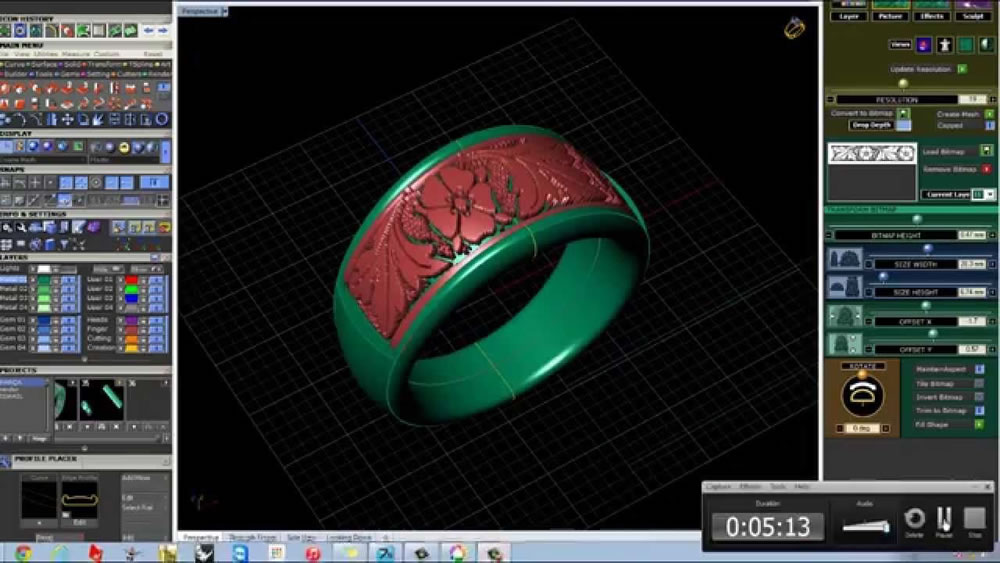
Matrix, one of the first programs that comes to mind when jewelry design is mentioned, is a popular and efficient tool for 3D-printed jewelry design. If you want to start a project from scratch, the Matrix jewelry design software is ideal. The program runs on the Rhino platform and needs to be installed alongside Rhino.
Pros and Cons of Matrix
- This software includes more realistic rendering and animation tools that produce more lifelike images and animation files.
- Matrix uses advanced 3D technology and the specific gravity of precious metals to tell you accurately how much your design will weigh in various gold karats.
- It shares the same advantages as other Rhino-based software, but this user interface is built entirely for jewelers. It also includes step-by-step builders to assist your creative explorations, including CAD/CAM jewelry design services.
- As before, this software has a downside, and that is that since it’s a complex tool, you need to have some experience to use it.
- There is no Mac OS version of the Matrix program. This is disappointing for Mac users.

Price of Matrix Software: Matrix 9.0 will cost you around $7,200 for a full installation. Some might think that’s expensive, but it’s probably worth it.
RhinoGold’s Flexibility
Because RhinoGold is built on Rhino 3D, it offers high flexibility and free-form modeling capability for jewelry design.
Parametric Jewelry Design
Software like Gemvision Matrix enables fast production of ring and jewelry designs with parametric templates.
Output Ready for 3D Printing
Jewelry design software can export the design directly in STL format, ready for 3D printing.
3Design
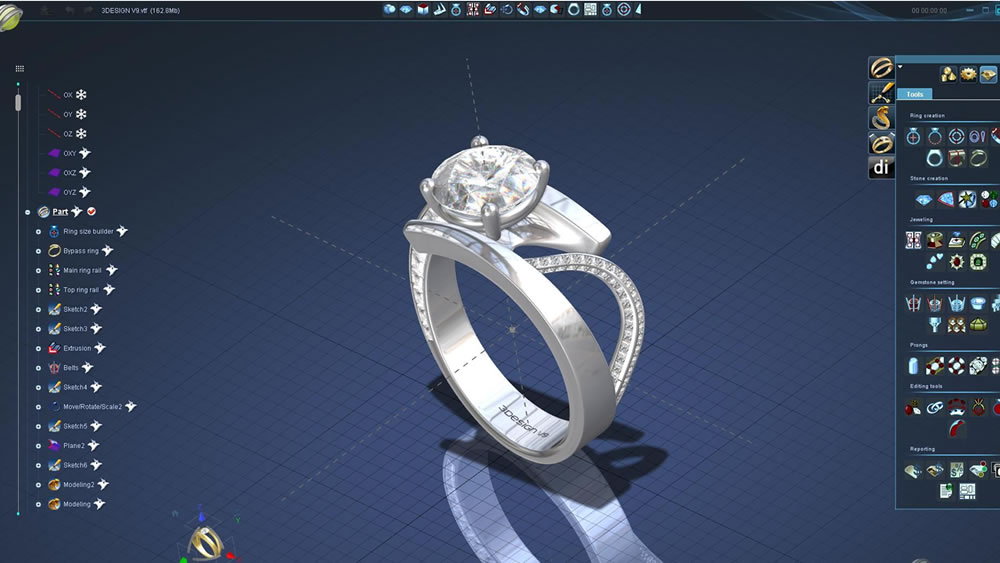
3Design is dedicated entirely to jewelry design. Using this software, you can create highly detailed 3D objects, and it lets you see photorealistic images of your 3D models before printing.
Pros and Cons of 3Design
- With this CAD software, inspired by video game graphics technology, you can achieve realistic rendering.
- It’s also easy to learn with a bit of training, since the interface is quite intuitive.
- Thanks to its “powerful parametric engine,” 3Design saves all your design’s parameters, making it easy to modify the design in front of the client or at a later stage.
- It includes many precision tools that will be useful for micro-pavé setting or stone shaping and will boost your productivity.
- The biggest downside of this software is that you always have to use the provided component catalog and combine those to create the new parts you want, which can make this software somewhat rigid.
3Design Pricing
3Design will cost you around $6,950 for full installation and use.
Firestorm CAD
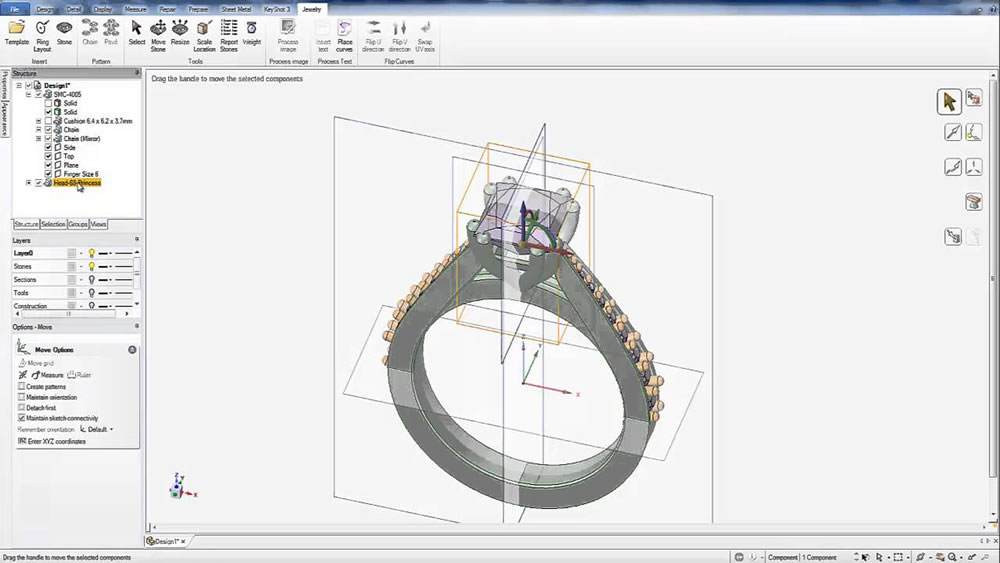
Firestorm CAD modeling software is designed for jewelry manufacturing. It’s a direct modeling program that can be used to build projects from scratch. This includes any simple design or advanced organic parts.
Pros and Cons of Firestorm
- Because it has a short learning curve, users don’t need to be experts to model with this software.
- It comes with a built-in 3D library of over 4,000 jewelry components, letting you create more than 10,000 pieces within minutes right in front of your prospective clients.
- It has a powerful yet easy-to-learn interface featuring real-time editing capabilities known as Direct Modeling.
- Stones have associated tools built into the structure of the program, which users can turn on and off as needed.
What Kind of Jewelry Design Is Firestorm Best Suited For?
When working with diamonds, this is the best software currently available. It has a dome-surface diamond layout with 320 different sizes and is excellent for building 3D jewelry with organic shapes.
Price of Firestorm: Getting yourself a full Firestorm Package will cost around $6,500.00
ZBrush
ZBrush, made by Pixologic, is a digital sculpting tool that lets users model, paint, and texture the object they plan to 3D print. With it, you can achieve high-resolution models using 3D Pixel technology. It’s ideal for working on the texture and surfaces of 3D models.

Pros and Cons of ZBrush
This software is by far the most comprehensive and includes many useful tools, including:
- Elastic Option for Curve Mode
- Liquid Option for Curve Mode
- Evenly Spaced Gizmo Mesh Duplication
- Remember Stroke Size
- However, it can be a difficult program to learn and requires a certain level of experience to really master.
How Will ZBrush Help With Jewelry Design?
ZBrush offers a service called Polygroup It, an entirely new way of creating polygon groupings that are essential for a smooth workflow and successful results. Polygroup It accurately evaluates the surface of the mode you’re working in, in real time, with a single click.
ZBrush’s Price: ZBrush costs around $895 USD.
In this article, we reviewed a few of the leading programs known as the best jewelry design software. We wanted to put together an overview that could give jewelers and jewelry designers some ideas. Looking forward to seeing you in future posts.
Related Questions
General programs like AutoCAD or SolidWorks don’t include the special libraries needed for jewelry design, such as ring or earring templates. Dedicated software speeds up the design process and makes it easier to learn, thanks to these ready-made components.
The program offers ready-made components for rings and other jewelry pieces, along with special tools for combining them. This lets a designer quickly create an original design by assembling existing building blocks instead of modeling every part from scratch.
Related Posts
 Advantages of Computer-Aided Design
  Catia vs SolidWorks Comparison
  Motion Capture Technology
  Free Disk Imaging – Cloning Program Reflect 8
  Mac OS: Remove Video From Files to Shrink Their Size
  What to Look for When Buying a Flash Drive
  The Best Laptops of 2022
  Recording Screen Video on Mac OS X. Screen Capture Without Software