

The Apple Watch brings your phone’s functionality to your wrist. Now, the growing Apple Watch app market is taking the device’s usefulness and functionality to new levels. Here are our picks for the best Apple Watch apps to make your life easier and more fun.
Best for Sleep Tracking: Pillow
Pillow is more than a sleep tracker. The app monitors your heart rate and movement to wake you during your lightest stage of sleep, resulting in much less morning grogginess.

- Automatic sleep tracking.
- Analyzes your sleep patterns and heart rate.
- Works with Apple Health’s sleep category.
- Choose your own wake-up sounds.
- You’ll need to upgrade to the premium version for advanced features.
The app’s audio-recording features let you listen to your snoring or sleep talking, which can help diagnose sleep apnea and other sleep disorders. Once you install Pillow on your iPhone, it will integrate your sleep data with Apple’s Health app and automatically track your sleep through your Apple Watch.
Download and use Pillow for free, but you’ll need to pay to upgrade to the premium version to unlock advanced features like personalized sleep tips, heart-rate analysis, and wake-up melodies from your iTunes library.
Download Pillow for Apple Watch
Shazam
The Apple Watch takes Shazam’s usefulness to new heights, eliminating the need to pull out your phone to try to identify a song. Just launch Shazam and point your Apple Watch toward the source of the music, and you’ll get your answer within seconds.
- Intuitive interface.
- Keeps a list of all your searches.
- Add a song to Apple Music or Spotify.
- Share songs on social media.
- Sometimes slow to identify music.
- Identification may be inaccurate if you’re too far from the speaker.
Once Shazam identifies a song, you have the option to add it to your library or launch it in Spotify or Apple Music. Use Shazam offline if you don’t have an internet connection, and turn on Auto Shazam to keep identifying songs even while you’re outside the app. Downloading and using Shazam is completely free.
Download Shazam for Apple Watch
Best Calculator App: CALC Smart
When it comes to watch-based calculator apps, CALC Smart is one of the best options. Use CALC Smart on your Apple Watch, then open the app on your phone to find your most recent calculations saved for review. Expand the calculator widget, search previous calculations, use a tip calculator, convert currency, and much more. While CALC Smart is great for students, it also shines in everyday-life functionality.

- Share your calculations.
- Intuitive and powerful user interface.
- Includes a currency converter.
- Share songs on social media.
- Saves all your previous calculations.
- Not free.
Download CALC Smart for Apple Watch
Heart Rate Measurement Interval
The Apple Watch can automatically measure heart rate about once a minute, and continuously during exercise.
Battery Life
A standard Apple Watch offers about 18 hours of battery life under typical use.
Number of watchOS Apps
The App Store has over 20,000 apps developed specifically for the Apple Watch.
Best Meditation App: Headspace
If you want to keep your stress levels low and improve your mood throughout the day, Headspace is an indispensable tool. This guided meditation app is useful for busy professionals, parents, young adults, or anyone caught up in the hectic reality of modern life.
- A great way to get started with meditation.
- Allows for quick, short sessions when you have downtime.
- If you’re unemployed, the company offers a free year-long subscription.
- You’ll need a paid subscription to unlock advanced features.
Sync your AirPods with your Apple Watch, open the app, and choose from hundreds of guided meditations. Session lengths vary, and there are two- and three-minute meditations especially for busy days.
Even if you’re skeptical about the metaphysical side of meditation, breath control has scientifically proven benefits. Even setting aside a few minutes of a busy day to focus on breathing can help improve your mood.
Downloading the app is free, but you’ll need to pay to upgrade to unlock advanced features.
Download Headspace for Apple Watch
Best Nutrition Tracker: Lifesum
Tracking what you eat is one of the most important elements of losing weight and improving your fitness, and Lifesum makes the process easy. Scan barcodes or take photos to instantly add meals to your daily log. Enter your daily food and water intake to see your current nutrition stats. Then view your progress throughout the day on your Watch.
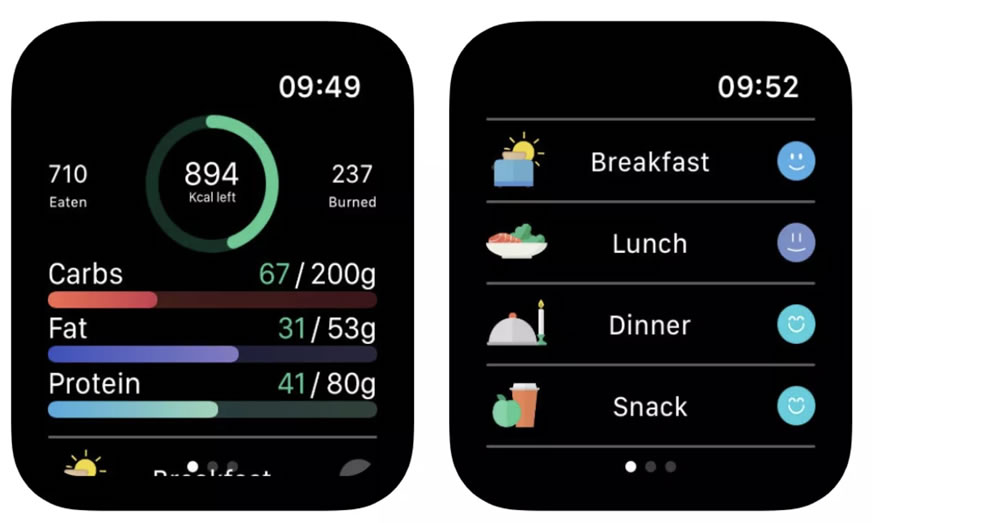
- Great for tracking water intake.
- Fast and easy to use.
- Track calories and macros.
- Covers keto, fasting, vegan, and other diets.
- Database is lacking compared to similar apps.
- No quick-add option for calories or macros on the Apple Watch.
Downloading and using Lifesum is free, but recipes, custom diets, and other features require a paid subscription.
Download Lifesum for Apple Watch
Best for Password Management: 1Password
We all know our passwords need to be complex, hard to crack, and changed frequently, and that we need to use different passwords for all our accounts — but doing so is hard. 1Password makes it easy by generating strong, unique passwords and storing them all. The only password you need to remember is the one for the app itself.

- Easy to use with a clean, fluid interface.
- Two-factor authentication included by default.
- Add custom fields for URLs, security questions, and more.
- You’ll need to switch to a paid subscription after the 30-day free trial.
1Password on the Apple Watch is especially handy, helping you access accounts while on the go or on a computer you don’t recognize. Just sync your Watch with the computer and, once you’ve verified your identity, log in to any of your accounts.
Download 1Password for Apple Watch
Find Near Me
The Find Near Me app is especially useful as an Apple Watch app, helping you easily find locations while traveling. The app searches for places around you across a range of categories. Search for restaurants, bars, shops, cafes, museums, and more, or look for something specific like a cheeseburger or ice cream. Find destinations you wouldn’t be able to find on your own, and save your search terms for future use.

- Works like a virtual tour guide.
- Automatically finds and plots your location.
- Customize with your own search terms.
- May not surface smaller, lesser-known businesses.
- Free version has ads.
Using and downloading the app is free, but you’ll need to pay to upgrade to an ad-free experience.
Download Find Near Me for Apple Watch
Best for Navigation: Apple Maps
If you’re part of the Apple ecosystem, Apple Maps is probably your go-to for getting from one place to another. The Apple Watch app carries on Apple Maps’ tradition of clear interfaces and real-time information. It’s especially useful for getting around on foot, by bike, or by public transit, particularly in cities.
- Maps are clear and easy to read on the go.
- Real-time traffic data.
- The Apple Watch app is great for walking around cities.
- Traffic data updates can sometimes be slow.
Real-time traffic information warns you of accidents and obstacles so you can find an alternate route. You can even explore a new city before you get there with the Apple Maps Look Around tool.
Download Apple Maps for Apple Watch
Best for Weather: Clime
When tracking severe weather, you don’t want to deal with the 15-minute update intervals many other weather apps are set to. Clime (formerly NOAA Radar Pro) gives you real-time updates and a satellite overlay showing current precipitation, cloud cover, and more.
- Real-time weather tracking.
- Monitor multiple locations at once.
- Rain and snow maps give detailed information.
- Get pressure, wind speed, and visibility details.
- A paid app
Set up multiple locations to monitor changing weather conditions near your home or your loved ones’ homes and get notifications about them. The app is easy to set up and use.
Download Clime for Apple Watch
Best for Selfies: Camera Remote
If you’re trying to take a photo in less-than-ideal light, any amount of movement can ruin the shot. That’s where Camera Remote comes in. This app lets you trigger your phone’s camera from your Apple Watch.
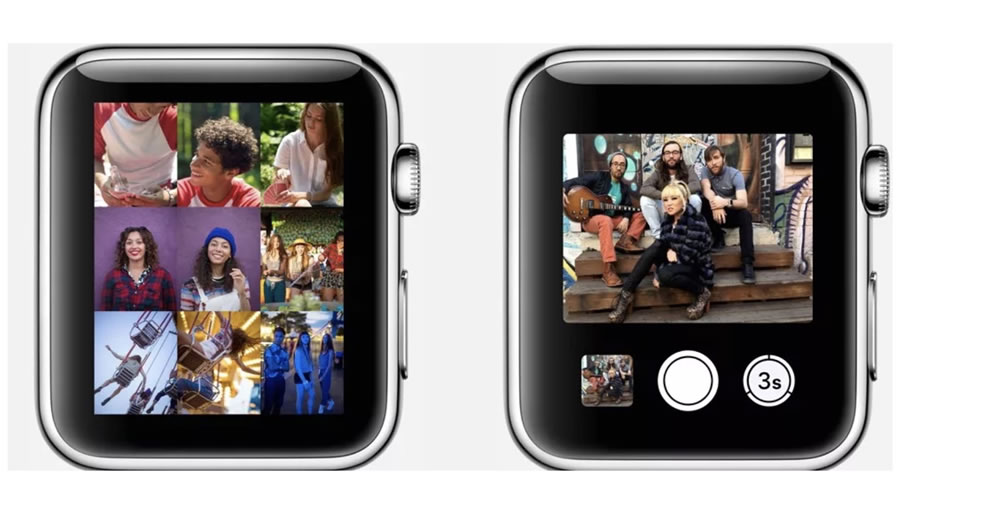
- Lets you use the higher-quality rear iPhone camera remotely.
- Functions as a viewfinder.
- The app can be complex to set up.
- The view isn’t always clear on the Apple Watch screen.
Just set up the shot and step back. Press the camera button in the app, and you’ll be able to capture a perfect photo without any risk of motion blur or shake. It’s great for a remote group selfie or setting up a more complex shot.
The Camera Remote app is a default part of your Apple Watch, so you just need to set it up. No download required.
Learn How to Use Camera Remote on Your Apple Watch
Related Questions
The watch uses heart rate and movement data to estimate when the body is in deep or light sleep. This lets it wake the person during a lighter phase of sleep, resulting in a less groggy wake-up.
Integration lets health data collected from different apps come together in one place. This way, the user can track information like sleep and heart rate from a single location without entering it into separate apps.
Related Posts
 Phone Not Charging: 6 Checks Before You Go to a Repair Shop
  Reducing Phone Ads Without Downloading an Ad Blocker App
  Best 8 Wireless Earbud Recommendations – 2023
  “Storage Full” Warning: 6 Ways to Free Up Space Without Deleting Photos
  What to Do When Your Phone Falls in Water? The Right Method (Not Rice)
  Why Does My Phone’s Battery Drain So Fast? 5-Step Fix
  WhatsApp Notifications Arriving Late: The Samsung and Xiaomi Fix
  The Best iPhone Call Recording Apps