
Close Menu
  • MAKİNELER ve İMALAT
    • Tools & Equipment
    • Computer-Aided Drawing
    • CAD/CAM Education
    • CNC Machine Programming
    • Casting Technologies
    • Electrical & Electronics Technologies
    • Hydraulics & Pneumatics
    • Manufacturing Processes
    • Manufacturing Technologies
    • Occupational Safety
    • Mold & Die Design
    • Solid Modeling
    • Welding Technology
    • Machine Elements
    • Mechanical Trade Drawing
    • Materials Science
    • Automotive & Vehicle Technologies
    • Robotics Technologies
    • Health Technologies
    • Defense & Aerospace Technologies
    • Descriptive Geometry
    • Technical Drawing
    • Software & Hardware Technologies
    • Innovative Manufacturing Methods
  • TEKNOLOJİ ve YAŞAM
    • OTOMOBİLLER ve TAŞIT
      • Vehicle & Engine Knowledge
      • Safe Driving
      • Sürüş Destek Sistemleri
    • Genel Kültür
      • Movies & TV Shows
      • Görsel ve Grafik Sanat
      • Books & Literature
      • Music
      • Sports
      • History
      • History of Technology
    • GÜNDELİK YAŞAM TEKNOLOJİLERİ
    • Hobbies & Entertainment
    • Internet Technologies
    • Health
    • Mobile Technologies
Makine Eğitimi
  • Machines & Manufacturing
    Machine Elements
    Hydraulics & Pneumatics
    Technical Drawing
    Computer-Aided Design & Manufacturing
    Basic Manufacturing Processes
    Manufacturing Processes
    Industry Technologies
    Other Technical Courses
    Motion & Power Transmission
    Simple Machines
    Chains & Sprockets
    Shafts & Journals
    Gears
    Cams
    Couplings
    Belts & Pulleys
    Springs
    Bearings
    Keys
    Fastening Joining
    Retaining Rings
    Screws, Bolts & Nuts
    Cotter Pins
    Flanges
    Welding
    Rivets
    Pins & Bolts
    Washers
    Calculators
    Gear Ratio Calculator
    Spring Constant Calculator
    Belt Pulley Ratio Calculator
    Other Machine Elements
    Slides & Linear Guides
    Brakes
    Flywheels
    Clamps
    Shock Absorbers
    Gaskets & O-Rings
    Seals & Sealing Elements
    Hydraulics
    Introduction to Hydraulics & Principles
    Hydraulic Systems & Applications
    Accumulators
    Filters
    Motors
    Pumps
    Valves
    Pneumatics
    Introduction to Pneumatics & Principles
    Pneumatic Systems & Applications
    Pneumatic Circuit Components
    Valves
    Cylinders
    Silencers
    Motors
    Compressors
    Dryers
    Conditioning Units
    Common Topics & Maintenance
    Hydraulic & Pneumatic Maintenance
    Study Notes, Exams & Tests
    Technical Drawing
    Introduction to Technical Drawing
    Geometric Drawings
    Perspective & Projection
    Orthographic Views
    Dimensioning
    Sectioning
    Assembly & Detail Drawings
    Tolerances
    Surface Finish Symbols
    Mechanical Engineering Drawing
    Screws, Bolts & Nuts
    Pulley Drawings
    Gear Drawings
    Shafts & Journals
    Bearing Drawings
    Pins & Bolts
    Spring Drawings
    Welds in Technical Drawing
    Washers
    Cotter Pins
    Technical Drawing Exercises
    Mechanical Drawing Exercises
    Gear Exercises
    View Extraction Exercises
    Pulley Exercises
    Pin & Bolt Exercises
    Threaded Fastening Exercises
    Descriptive Geometry
    Computer-Aided Drawing
    AutoCAD Drawing Lessons
    Solid Modeling & Animation
    Solid Model Drawing Files
    Solid Model Assembly Examples
    Solid Model Drawing Lessons
    3D CAD Software Reviews
    Solid Modeling Exercises
    CNC Programming
    CAM
    Measurement & Inspection
    Dial Indicators
    Calipers
    Gauges
    Micrometers
    Materials Science
    Steels
    Cast Iron
    Aluminum
    Plastics
    Material Testing & Hardness Measurement
    Occupational Safety
    Workshop Safety
    Safety When Working With Electricity
    Machine Safety Rules
    Hand Operations
    Filing
    Marking
    Cutting Operations
    Reaming
    Tapping
    Threading With a Die
    Drill Bit Sharpening
    Working With Machines
    Basic Turning Operations
    Basic Milling Operations
    Shaper Machine
    Machining
    Turning
    Milling
    Grinding
    Innovative Manufacturing Methods
    EDM (Electrical Discharge Machining)
    Laser Machining
    Waterjet Machining
    3D Printing
    3D Scanners
    Welding
    Rolling
    Casting
    Mold & Die Design
    Mechanical & Hydraulic Presses
    Blanking & Piercing Dies
    Bending Dies
    Drawing Dies
    Plastic Injection Molds
    Extrusion Dies
    Compound Dies
    Progressive Dies
    Blow Molds
    Spinning Dies
    Spray Molds
    Manufacturing of Machine Parts
    Automotive & Vehicle Technologies
    Motor Vehicle Manufacturing
    Raw Material Production
    History of Technology
    Health & Medical Technologies
    Defense & Aerospace
    Robotics Technologies
    Software & Hardware Technologies
    Mechanics - Strength of Materials
    Physics Topics
  • Technology & Life
    Hobbies & Entertainment
    Sports
    Music
    Vehicle & Engine Knowledge
    Vehicle Maintenance & Repair
    Safe Driving
    Driver Assistance Systems
    History
    Movies & TV Shows
    Books & Literature
    Computers & Internet
    Computer Tips
    Software Reviews
    Hardware & Peripherals
    Practical & Safe Internet Use
    Visual & Graphic Art
    Mobile Technologies
    Travel
    Science
    Health
    First Aid Knowledge
    Everyday Technologies
Makine Eğitimi
Home»Innovative Manufacturing Methods»Stages of Manufacturing with 3D Printers
29 August 2026

Stages of Manufacturing with 3D Printers

Stages of Manufacturing with 3D Printers
  • Stages of Manufacturing with 3D Printers
    • Model Design for 3D Printing
    • Converting the Model to STL File Format
      • Characteristics of the STL File Format
    • Checking and Fixing Model Errors
    • Generating G-Code with a Slicer
    • Pre-Processing
    • The Printing Process
    • Post-Processing
  • Related Questions
stages of manufacturing with 3D printers - 3d printer manufacturing processes

Stages of Manufacturing with 3D Printers

Model Design for 3D Printing

First, there must be a CAD model (a digital model drawn in a computer environment) of the product you want to produce with 3D printing. There are many software programs on the market that allow you to create a CAD model, and these programs differ in their complexity. In addition to programs for industrial design like SolidWorks, AutoCAD, Rhinoceros, and Fusion 360, you can also choose free, web-based software like Tinkercad for making very simple parts.

cad design

See related article: The Best Free CAD Software for 3D Print Design

Since design is the starting point of 3D printing, it is an important part of the process. For parts to be produced with 3D printing, this is a stage where the object’s dimensions, whether it needs to be functional, how your object will respond under various environmental conditions, and which material and 3D printing technology it will be produced with all need to be considered.

Converting the Model to STL File Format

After the CAD model is created, the file needs to be converted to a format specific to 3D printing. Although there are many formats, the most commonly used format for 3D printers is the STL format. We’ve explained the reasons for this below. Nowadays, many modern CAD programs can easily perform the conversion to STL format.

Characteristics of the STL File Format

ASCII or Binary Format: STL files can be saved in ASCII (human-readable text) or binary (machine-readable) format. Binary files are generally smaller and faster to process.
No Color or Texture Information: STL files do not contain any information about color or texture, which makes them suitable for 3D printing.
No Layers or Groups: STL files do not contain information about separate layers or groups that could be used to organize and modify objects, as in other file formats.

Checking and Fixing Model Errors

You may not have followed design rules while designing your CAD model. Because of this, your file may not be suitable for 3D printing once converted to STL. However, if you’ve designed your CAD model appropriately for 3D printing, you won’t run into problems.

You can check for errors in your STL file using programs like Meshmixer, and fix some of these errors before getting a quote from a 3D printing service. Meshmixer is a 3D modeling software used to create and modify 3D models. It allows tasks such as combining multiple 3D models, smoothing and shaping models, repairing models, creating supports for 3D printing, and more.

Generating G-Code with a Slicer

3D printing typically uses a process called slicing, which takes a 3D model and converts it into a series of 2D layers that the printer can build to create the final 3D object. G-code, a set of commands for the printer, is generated during the slicing process. It defines the movements of the print head, the printing temperature, the movement speed, and other aspects of the printing process.

Most slicing software allows the user to select the 3D model to be printed, set print settings such as infill density and layer height, and then generate the G-code. The G-code is then uploaded to the printer and the printing process can begin.

Many slicing software options are available for 3D printing. Some popular options include: Cura, PrusaSlicer, MatterControl, Simplify3D, KISSlicer, Slic3r, IdeaMaker, Ultimaker Essentials

3d printer slicer
MatterControl

These programs offer various features and options to customize the printing process, such as support generation, infill patterns, and print speed. Some of these programs are open-source and free, while others are commercial and require a paid license.

Pre-Processing

With the G-code generated, the stages related to the digital file are complete. At this stage, the 3D printer needs to be prepared for printing. Material loading and pre-processing steps specific to the printing technology are performed.

For FDM, this includes loading the filament, heating the print bed, and applying adhesive; for SLS, this includes loading the powder, cleaning out powder left over from the previous print, and heating the interior of the build chamber.

Once these preparations are complete, the printing process begins.

3d print filament
3D print filaments and sample products

The Printing Process

After the printer and the necessary equipment are prepared, the 3D printing process begins.

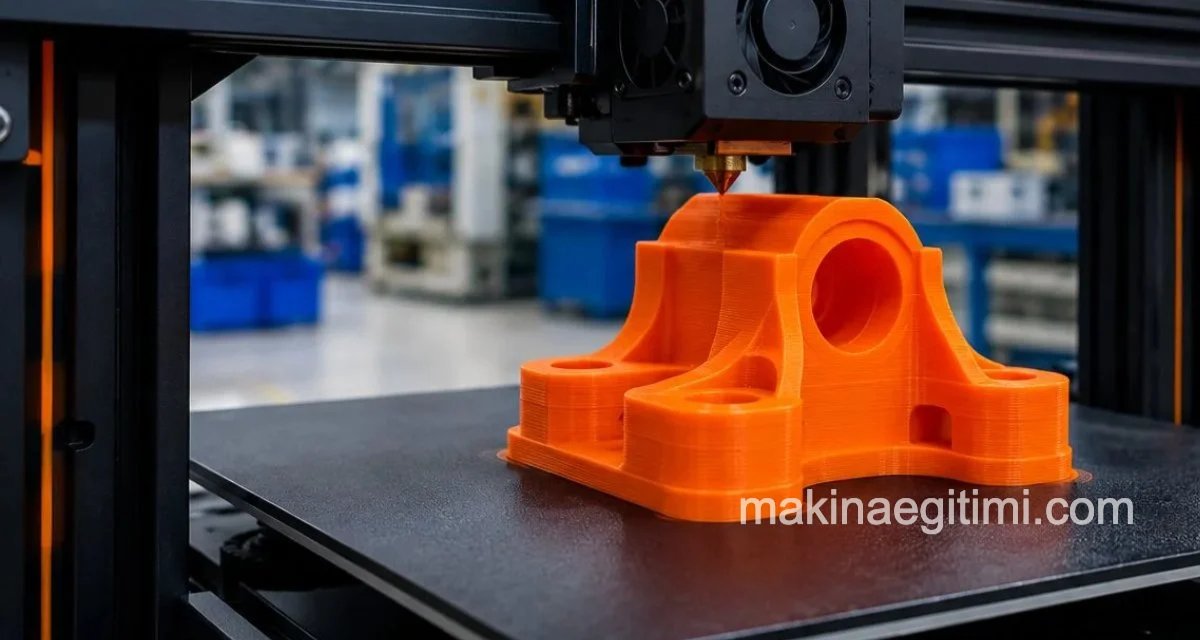
3D printing, also known as additive manufacturing, is the process of creating 3D objects by adding material layer by layer. It works by using a printer to extrude molten plastic or other materials from a small nozzle, laying down successive layers until the entire object is complete.

The final result is a physical object that closely matches the original digital model.

3d printing
3D Printer and the produced part

Post-Processing

After the 3D printing process is complete, the part may need to undergo some additional processing. These steps vary from technology to technology, and may include removing support material, smoothing out any rough spots if present, and, depending on the need, sandblasting, sanding, painting, or polishing.

Layer Thickness


In standard FDM 3D printing, layer thickness is usually set between 0.1-0.3 mm.

Support Structures


For overhanging or hollow geometries, temporary support structures are automatically added during printing.

Finishing Process


Post-print finishing steps such as removing supports, sanding, and painting determine the part’s final quality.

Related Questions

CAD programs store the model in different internal formats, but 3D printers can’t read these formats directly. STL translates the model’s surface into simple triangles, converting it into a common language the printer can understand.

The environment the part will be used in (temperature, humidity, mechanical load) determines which material is suitable. A design made without considering this can turn out inadequate or fragile once produced.

Related Posts

Materials Used in 3D Printing Materials Used in 3D Printing Laser Cutting Working Principle Laser Cutting Working Principle, Advantages and Disadvantages Günümüzde ve Gelecekte 3b Yazıcı Uygulamaları 3D Printer Applications Today and in the Future laser rust removal Laser Cleaning: Removing Rust, Dirt, and Grease Applications of Lasers Applications of Lasers laser devices used in medicine Properties of Laser and Laser Devices Used in Medicine Electrical Discharge Machining (EDM) Machines Electrical Discharge Machining (EDM) Machines Eklemeli İmalat (3D Baskı) Nedir? Yöntemleri ve Kullanım Alanları What Is Additive Manufacturing (3D Printing)? Methods and Applications
3D Printing
Share. Facebook Twitter WhatsApp Tumblr Email Telegram Copy Link

Leave A Reply Cancel Reply

How Do Athletes Eat? Nutrition Disciplines Across Different Sports
Coilover (Coil Spring Shock Absorber) Advantages and Disadvantages
  • Contact
  • Terms of Service
  • Privacy & Cookie Policy

Type above and press Enter to search. Press Esc to cancel.