
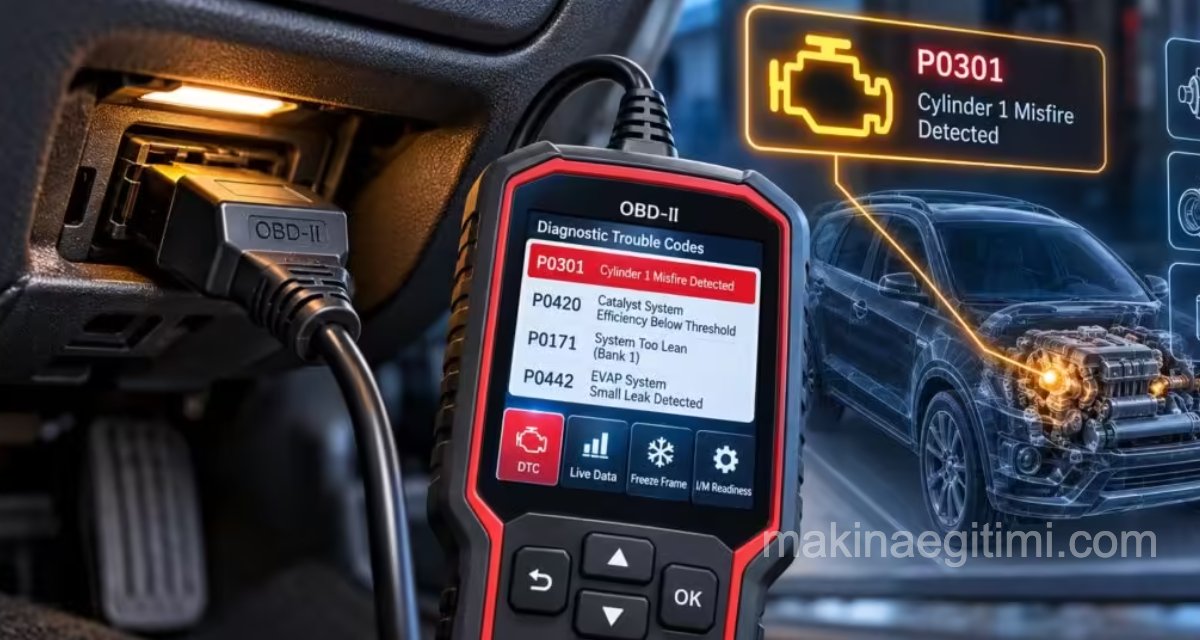
OBD-II (On-Board Diagnostics II) is a standardised self-diagnostic system that continuously monitors the engine, transmission, emissions and, increasingly, the electronic systems of modern vehicles. It has been mandatory in new vehicles in the US since 1996 and in the European Union (under the name EOBD) since 2001 (2004 for diesel vehicles). In this article, we examine in detail the operating principles of OBD-II, the structure of fault codes (DTCs), how to read these codes, and the limitations of the diagnostic process.
How Does OBD-II Work?
The dozens of sensors in the vehicle (oxygen sensor, MAP/MAF sensor, crankshaft and camshaft position sensors, coolant temperature sensor, etc.) continuously send data to the engine control unit (ECU). The ECU constantly compares this data against the ‘normal operating ranges’ defined by the manufacturer.
When a value falls outside the expected range or a component’s signal becomes physically illogical (for example, a short circuit or an open circuit), the system generates a Diagnostic Trouble Code (DTC – Diagnostic Trouble Code) and usually illuminates the engine fault light (MIL) on the instrument panel.
For a fault code to become permanent, it is not usually a one-off occurrence; most manufacturers require the fault to be detected twice in two consecutive drive cycles. This ‘two-cycle rule’ prevents temporary and insignificant signal fluctuations from causing the fault indicator light to illuminate unnecessarily.
DTC Code Structure and the SAE J2012 Standard
Fault codes follow a five-character format structured in accordance with the SAE J2012 standard: one letter and four digits. The first letter indicates the main system in which the fault has occurred.
- P (Powertrain) — Codes relating to the engine and gearbox; the most common category
- B (Body) — Codes relating to the bodywork: airbag, air conditioning, lighting, seat control
- C (Chassis) — Codes relating to the chassis: ABS, suspension, steering
- U (Network/Undefined) — Codes relating to network communication: CAN-Bus and inter-module communication errors
The first digit following the letter indicates whether the code is generic (0) or manufacturer-specific (1). Whilst generic codes have the same meaning across all manufacturers, manufacturer-specific codes (e.g. P1xxx) provide additional diagnostic information specific to that make. The second digit indicates the subsystem (1: fuel/air mixture, 2: fuel system, 3: ignition/misfire, 4: auxiliary emission controls, 5: vehicle speed/idle control, 6: computer/output circuits, 7–8: transmission). The final two digits identify the specific type of fault. For example, P0301 means ‘Cylinder 1 misfire detected’, whilst P0171 means ‘bank 1 lean mixture’.
| Category | System | Sample Code | Meaning |
|---|---|---|---|
| P | Powertrain (engine/gearbox) | P0301 | Cylinder 1 misfire |
| B | Body (chassis) | B0012 | Driver airbag circuit fault |
| C | Chassis | C0035 | Left front wheel speed sensor circuit |
| U | Network | U0100 | Loss of communication with the engine ECU |
How to Read Fault Codes?
Fault codes can be read by connecting a scanner to the standard 16-pin OBD-II port (SAE J1962 connector), which is usually located under the seat or beneath the steering wheel. This port features pin configurations that vary according to the CAN-Bus, K-Line or (in older vehicles) J1850 protocols, but the physical connector type is standard across all vehicles; this is the most practical aspect of OBD-II.
Hardware Options
There are three tiers of scanners available on the market: inexpensive Bluetooth/Wi-Fi ELM327 adapters (basic code reading via a mobile app), mid-range handheld scanners (live data graphs, reset functions) and professional-grade dealer-level devices (access to manufacturer-specific codes, calibration and programming functions). Whilst ELM327-based adapters are sufficient for hobbyists, dealer-grade devices are required for tasks such as ADAS calibration.
Reading Live Data
Beyond simply reading codes, most scanners can also display real-time sensor values via standard data channels known as PIDs (Parameter IDs). For example, PID 0x0C reads engine speed (RPM), PID 0x0D reads vehicle speed, PID 0x05 reads coolant temperature, and PID 0x11 reads throttle position. This live data generally provides far more information than static code when it comes to understanding why a fault code has been generated; for example, in the case of an oxygen sensor fault code, whether the sensor’s live voltage waveform shows normal fluctuations is a crucial clue.
The Limits of Code Reading
A fault code indicates which system has been found to be malfunctioning, rather than the exact cause of the problem. For example, a ‘misfire’ code may be caused by a fault with the spark plug, ignition coil, fuel injector, loss of compression or a fuel pressure issue.
The code serves as the starting point for the diagnostic process; further checks involving measurements, visual inspection and experience are required to reach a definitive diagnosis. For this reason, in professional diagnostics, ‘code reading’ and ‘fault diagnosis’ are two distinct skills; simply reading the code and replacing the relevant component / part (the ‘parts cannon’ approach) often leads to unnecessary expenditure.
Readiness Monitors and Emissions Testing
The OBD-II system includes ‘readiness monitors’ that ensure certain subsystems (catalytic converter, oxygen sensor, evaporative system, EGR, etc.) perform periodic self-tests, even in the absence of a fault. If the battery cable is disconnected or fault codes are cleared, these monitors revert to an ‘unready’ state and remain so until the vehicle has completed several driving cycles. In many countries, it is a requirement during emissions testing that all monitors are in the ‘ready’ state; therefore, clearing fault codes immediately before the test may prevent the vehicle from passing.
P, B, C, U Code Categories
P codes indicate engine/transmission faults, B codes indicate bodywork faults, C codes indicate chassis faults, and U codes indicate network/communication faults.
Freeze-Frame Data
A freeze frame, which captures data such as engine revs, speed and temperature at the moment a fault occurs, significantly speeds up the diagnosis.
Readiness Monitors
In order to pass the emissions test, all readiness monitors must be in the ‘completed’ status.
What Does the Way the Warning Light Flashes Indicate?
The way the engine fault light illuminates provides important information about the urgency of the problem:
- Steady warning light: A fault has been detected in the system; whilst this does not usually pose an immediate threat to driving safety, it should not be ignored.
- Flashing warning light: An active and severe misfire has been detected; there is a high risk of damage to the catalytic converter; the vehicle must be stopped as soon as possible and taken for inspection.
- The light remaining off continuously: In some vehicles, it is normal for the light to flash on and off for 2–3 seconds when the ignition is switched on; if it does not come on at all, this indicates that there may be a separate fault in the light circuit.
From OBD-II to OBD-III and Towards Remote Diagnostics
Nowadays, many manufacturers transmit OBD-II data to cloud servers via an in-vehicle telematics module; this approach, sometimes referred to as ‘OBD-III’, enables fault codes to be transmitted in real time to the manufacturer or dealer, and even allows certain software-related faults to be rectified remotely (over-the-air). In electric and hybrid vehicles, the scope of the OBD-II standard has been extended so that faults in the battery management system, electric motor and charging circuit are also reported using a similar code structure (for example, the P0A–P0D range).
Freeze Frame Data: A Snapshot of the Fault
When a fault code is recorded, the ECU also stores a data packet known as a ‘freeze frame’; this packet contains a snapshot of dozens of parameters—such as engine speed, vehicle speed, coolant temperature, throttle position and fuel system correction values—at the exact moment the code was triggered. Freeze frame data is of critical importance for understanding the conditions under which the fault occurred (for example, only when the engine is cold, at high revs, or at idle) and is one of the scanner’s most valuable features for diagnosing non-recurring (intermittent) faults.
Mode and Service Functions
The SAE J1979 standard defines ten ‘service modes’ through which an OBD-II scanner can communicate with the vehicle. The most commonly used of these are:
Mode 01 (live data/PID read),
Mode 02 (freeze frame data),
Mode 03 (listing stored fault codes),
Mode 04 (resetting codes and the MIL),
Mode 06 (manufacturer-specific test results, such as misfire counters) and Mode 09 (vehicle information: VIN number, calibration ID). Mode 06 is particularly valuable for advanced diagnostics as it also displays test results that are still ‘on the borderline’ and would not yet trigger a fault code; this allows a component to be detected at an early stage before it fails.
Pending codes also constitute a separate category in this system: when a fault is detected for the first time, the MIL does not illuminate yet; the code is recorded as ‘pending’. If the same fault recurs during the second driving cycle, the code becomes ‘confirmed’ and the warning light illuminates. Thanks to this two-stage structure, one-off sensor noise does not trigger unnecessary warnings.
The Relationship Between OBD-II and the CAN Bus
In vehicles manufactured in the US since 2008—and increasingly in European vehicles as well—the OBD-II protocol operates at the physical layer via CAN-Bus (ISO 15765-4). This means that the OBD-II port also serves as a direct access point to the vehicle’s internal CAN network; the scanner communicates with many different modules.
From the engine ECU to the transmission control unit, and from the ABS module to the body control unit – via the same physical bus, using different message identifiers (IDs). For this reason, the OBD-II port is regarded both as a diagnostic tool and, if misused, as a potential cybersecurity access point.
Frequently Asked Questions
Yes, scanners—which are available in a wide range, from inexpensive Bluetooth adapters to professional-grade devices—can be used easily in conjunction with mobile apps. However, professional-grade devices are required for advanced tasks such as calibration and programming.
A steady warning light is generally safe for short-term use, but a flashing light indicates an active and severe misfire; in this case, it is recommended that the vehicle be stopped as soon as possible.
No, clearing the code only temporarily removes the warning and resets the readiness monitors; if the underlying problem is not resolved, the code will reappear shortly afterwards.
Almost all vehicles manufactured after 2001 (2004 for diesel models) are fitted with a standard 16-pin OBD-II port in accordance with EU and US standards.
P0xxx codes have the same standard meaning across all manufacturers; P1xxx codes, however, are manufacturer-specific and require the relevant brand’s service documentation to be interpreted correctly.
Yes, the code-clearing process resets the readiness monitors; as most vehicle inspection centres require all monitors to be ‘ready’, the vehicle may fail the inspection.
Related Posts
 How Is Car Window Fogging Prevented
  What Is Piston Ring Replacement? How Is It Done?
  Blue Smoke from the Exhaust and Its Causes
  Car Exhaust System Maintenance Tips
  Removing Stains from a Leather Couch
  Fuel Pump Failure Symptoms
  What Is an Intake Manifold? Its Job, and Diagnosing a Fault
  5 Tips for Cleaning Pet Hair