
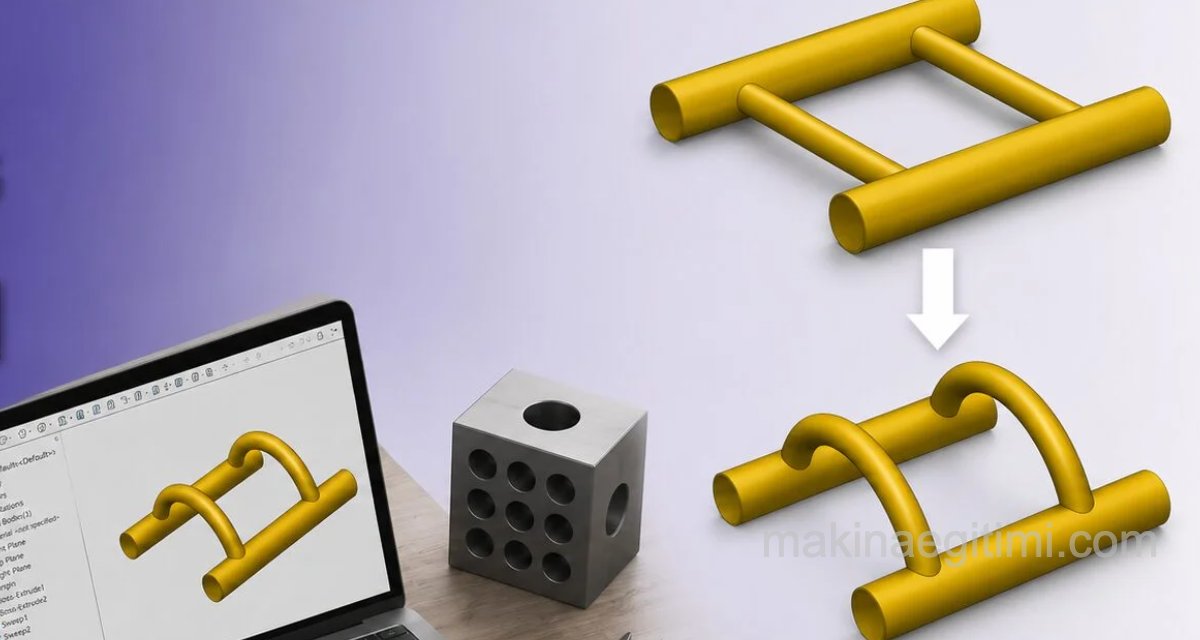
To get familiar with commands in your SolidWorks work and become proficient enough, you should do various exercises yourself and study different example applications to build intuition. Here’s one more of the training pieces prepared for this purpose.
Video Walkthrough
Illustrated Walkthrough

In SolidWorks, it’s possible to bend any solid about specific axes, as shown above.
We can use the FLEX command for this. If you’re wondering how the unbent version of the part was made, you can check it out HERE.

This command isn’t in the menus. However, if we click the small arrow next to the settings icon on the top toolbar and select CUSTOMIZE from the menu that opens, we can create our own menu items.

Let’s go to the Commands tab in the Customize window and type FLEX into the search box. Let’s grab the icon that appears and drag it into the menu.
(Click the image to enlarge it)

Basic usage of the Flex command is shown above. Using the BENDING option of this command, we can bend our part by a certain angle. We can also determine where the bending plane will pass through.
Related Posts
 AutoCAD 3D Drawing Exercise Example. Step-by-Step Guide
  SolidWorks Assembly Drawing Examples – Stuffing Box
  SolidWorks 3D Simple Exercise 1 SolidWorks Ready-Made Drawings – Door Bolt Assembly and Detail
  SolidWorks Assembly Examples – Suspension System
  SolidWorks Practical Solutions and Tips-2
  SolidWorks Sample Solid Model Drawing -3 / Video + Document
  AutoCAD Solid Model Examples