
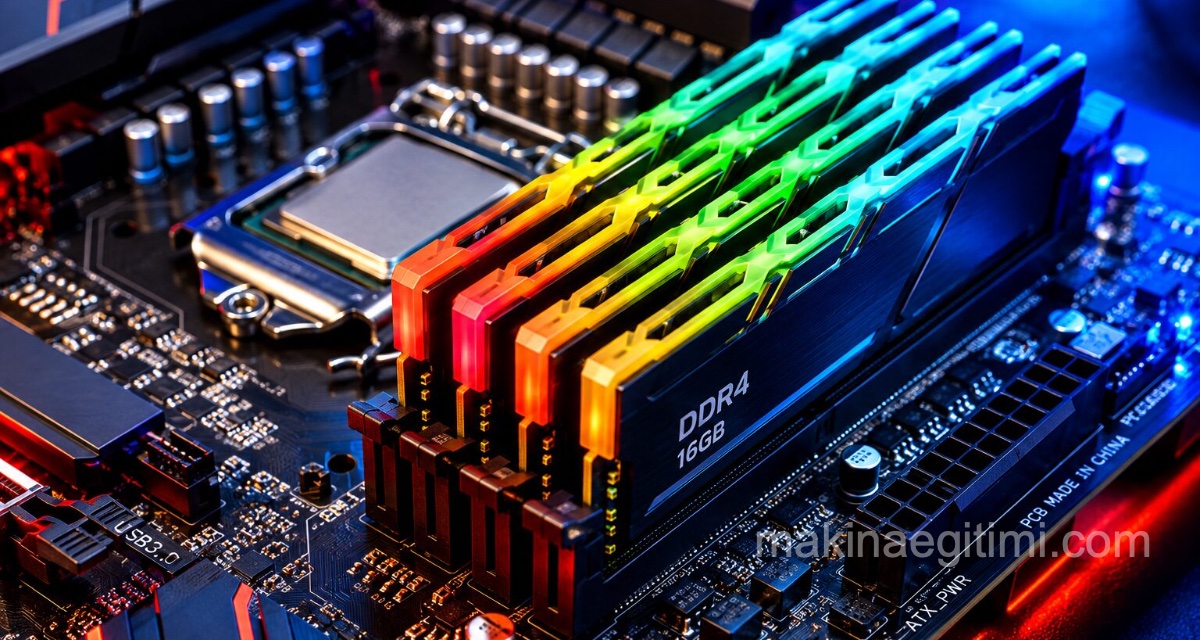
This article covers what RAM memory is in computers, how it works, its characteristics, and what types of RAM there are.
Almost every computing-capable device needs RAM . For example, smartphones, tablets, desktop computers, laptops, graphing calculators, HDTVs, gaming consoles, etc.
While RAM essentially serves the same purpose, there are several commonly used different types:

What Is RAM Memory?
RAM stands for Random Access Memory, and it provides computers with the virtual space needed to manage information and solve problems at that moment.
How Does RAM Memory Work?
You can also think of RAM as reusable scratch paper on which you can write notes, numbers, or drawings with a pencil. When you run out of space on the paper, you make more room by erasing what you no longer need;
RAM behaves similarly when it needs more space to deal with temporary information (i.e., running software/programs). Larger sheets of paper let you scribble more (and bigger) ideas at once without having to erase; more RAM inside computers shares a similar effect.
RAM comes in various forms (i.e., the way it physically connects to or interfaces with computing systems), capacities ( measured in MB or GB ), speeds ( measured in MHz or GHz ), and architectures. Because computer systems (e.g., hardware, motherboards) must adhere to strict compatibility guidelines, these and other considerations must be taken into account when upgrading RAM-equipped systems. For example:
- Older-generation computers are unlikely to support newer types of RAM technology.
- Laptop memory does not fit desktop computers (or vice versa)
- RAM is not always backward compatible
- A system generally cannot mix and match different types/generations of RAM.
DDR Generation Differences
DDR4 memory offers higher bandwidth and lower power consumption than DDR3.
Memory Frequency
RAM frequency is measured in MHz; a higher frequency allows data transfer to occur faster.
Dual-Channel Use
Using two RAM modules in dual-channel mode can nearly double memory bandwidth compared to a single module.
Types of RAM
The types of RAM are:
- Static RAM (SRAM)
- Dynamic RAM (DRAM)
- Synchronous Dynamic RAM (SDRAM)
- Single Data Rate Synchronous Dynamic RAM (SDR SDRAM)
- Double Data Rate Synchronous Dynamic RAM (DDR SDRAM, DDR2, DDR3, DDR4)
- Graphics Double Data Rate Synchronous Dynamic RAM (GDDR SDRAM, GDDR2, GDDR3, GDDR4, GDDR5)
- Flash Memory
Static RAM (SRAM)
A type of RAM in use since the 1990s. Popular products that use SRAM: Digital cameras, routers, printers, LCD displays.
One of two basic memory types (the other being DRAM), SRAM requires a constant flow of power to operate. Because of the constant power, SRAM does not need to be ‘refreshed’ to remember the data it stores. This is why SRAM is called ‘static’ — no change or action (e.g., refreshing) is needed to keep the data intact. However, SRAM is volatile memory; this means all stored data is lost when power is cut.
The advantages of using SRAM (versus DRAM) are lower power consumption and faster access speeds. The disadvantages of using SRAM (versus DRAM) are lower memory capacities and higher production costs. Because of these characteristics, SRAM is used in the following areas:
- CPU cache (e.g., L1, L2, L3)
- Hard drive buffer/cache
- Digital-to-analog converters (DACs) in video cards
Dynamic RAM (DRAM)
One of two basic memory types (the other being SRAM), DRAM requires periodic power ‘refreshing’ to operate. The capacitors that store data in DRAM gradually discharge energy; a lack of energy means the data is lost. This is why DRAM is called ‘dynamic’ — continuous change or action (e.g., refreshing) is required to keep the data intact. DRAM is also volatile memory; this means all stored data is lost when power is cut.
Used from the 1970s to the mid-1990s. DRAM was preferred in video game consoles and networking hardware.
The advantages of using DRAM (versus SRAM) are lower production costs and higher memory capacities. The disadvantages of using DRAM (versus SRAM) are slower access speeds and higher power consumption. Because of these characteristics, DRAM is used in the following areas:
- System memory
- Video graphics memory
In the 1990s, Extended Data Out Dynamic RAM (EDO DRAM) was developed, followed by its evolution, Burst EDO RAM (BEDO DRAM). These memory types were attractive due to increased performance/efficiency at lower costs. However, the technology was superseded with the development of SDRAM.
Synchronous Dynamic RAM (SDRAM)
SDRAM is a classification of DRAM that operates synchronized with the CPU clock, meaning it waits for the clock signal before responding to data input (e.g., the user interface). In contrast, DRAM is asynchronous, meaning it responds to data input immediately. However, the benefit of synchronous operation is that a CPU can process overlapping instructions in parallel, which is called ‘pipelining’.
A type of RAM in use since 1993. Popular products that use SDRAM: Computer memory, video game consoles
Single Data Rate Synchronous Dynamic RAM (SDR SDRAM)
SDR SDRAM is an extended term for SDRAM. ‘Single data rate’ indicates how the memory processes one read and one write instruction per clock cycle. This labeling helps clarify the comparisons between SDR SDRAM and DDR SDRAM:
One of the types of RAM memory in use from 1993 to today. Popular products that use SDR SDRAM: Computer memory, video game consoles
Double Data Rate Synchronous Dynamic RAM (DDR SDRAM)
DDR SDRAM is essentially the second-generation development of SDR SDRAM. It is a type of RAM memory that has been in use from 2000 to today.
DDR SDRAM works like SDR SDRAM, only twice as fast. DDR SDRAM can process two read and two write instructions per clock cycle (hence ‘double’). Although similar in function, DDR SDRAM has physical differences (184 pins and a single notch on the connector) from SDR SDRAM (168 pins and two notches on the connector). DDR SDRAM also operates at a lower standard voltage (2.5 V versus 3.3 V), which prevents backward compatibility with SDR SDRAM.
- DDR2 SDRAM is an evolutionary upgrade of DDR SDRAM. While the data rate is still doubled (processing two read and two write instructions per clock cycle), DDR2 SDRAM is faster because it can operate at higher clock speeds. Standard ( non-overclocked ) DDR memory modules top out at 200 MHz, while standard DDR2 memory modules top out at 533 MHz. DDR2 SDRAM operates with more pins (240) at a lower voltage (1.8 V), which prevents backward compatibility.
- DDR3 SDRAM improves performance over DDR2 SDRAM through enhanced signal processing (reliability), greater memory capacity, lower power consumption (1.5 V), and higher standard clock speeds (up to 800 MHz). Although DDR3 SDRAM shares the same number of pins as DDR2 SDRAM (240), every other aspect prevents backward compatibility.
- DDR4 SDRAM improves performance over DDR3 SDRAM through even more advanced signal processing (reliability), greater memory capacity, even lower power consumption (1.2 V), and higher standard clock speeds (up to 1600 MHz). DDR4 SDRAM uses a 288-pin configuration, which also prevents backward compatibility.

Popular products that use DDR SDRAM: Computer memory
Graphics Double Data Rate Synchronous Dynamic RAM (GDDR SDRAM)
A type of RAM memory in use since 2003. Popular products that use GDDR SDRAM: Video graphics cards, some tablets.
GDDR SDRAM is a type of DDR SDRAM specifically designed for video graphics processing, typically in connection with a dedicated GPU (graphics processing unit) on a video card. Modern PC games are known to push the boundaries with incredibly realistic, high-definition environments that usually require demanding system specs and top-tier video card hardware (especially when using 720p or 1080p high-resolution displays) .
Flash Memory
Flash memory: a type of persistent storage medium that retains all data even after power is cut. Despite its name, flash memory is closer in form and operation to solid-state drives than to other types of RAM. Flash memory is most commonly used in:
A type of RAM in use from 1984 to today. Popular products that use flash memory: USB flash drives, printers, portable media players, memory cards, small electronic devices and toys, smartphones/tablets.
Related Questions
RAM is a temporary workspace that loses its contents when the computer is turned off or a program closes. A hard disk, on the other hand, continues to store data permanently even when power is cut.
Freezing, lag, and an overall slowdown are felt when switching between programs. These symptoms become even more pronounced when many tabs or applications are open at the same time.
Related Posts
 Mac OS: Remove Video From Files to Shrink Their Size
 Color Codes Program for Mac OS X. Download Color Picker
 What Is Google One. Its Plans and Pricing
 Best Landscape Design Software – Review
 Mac OS – Cutting and Merging Video Without Downloading Software
 Software Used in Motion Capture (Mocap)
 Motion Capture Technology
 Changing the Mac OS X Screenshot Save Location