

In this article, in the Machine Technology CNC turning cycles section, we’ll cover the facing cycle. We’ll give examples of using the G94, G72, and G70 codes.
Facing Cycle (G94 – G72)
G94 Single-Pass Facing Cycle
G94 is a straight or taper facing cycle on Fanuc control units.
With the G94 command, motion starts from the starting point with rapid traverse. After turning is performed between the given points at the given F feed rate, the tool returns to the starting point again with rapid traverse.
The G94 command is a modal command. Once used, it doesn’t need to be written again unless canceled. The facing cycle is simply repeated by changing the Z value.
Once the operation is complete with the cycle command, it’s canceled with another G code from the same group (for example, with the G00 command).
The T, S, and M functions used in the G94 turning cycle must be specified before the cycle starts.
G94 Facing (Single Pass)
G94 X… Z… F…
X: Outer X dimension of the cycle
Z: End point of the first pass in the Z direction
F: Tool feed rate (this is a modal G code;
it can be canceled with another motion G code once the passes are complete.
EXAMPLE:
G94 X42 Z2 F0.1
Z1
Z0
G72 Facing Roughing Cycle (Turning Perpendicular to the Axis)
The G72 facing cycle is used to machine shapes with a profile that varies monotonically along both the X axis and the Z axis.
Once the finishing profile is defined in the program, the roughing pass movements are generated automatically.
A finishing allowance of U is left on the X axis, and W(2) on the Z axis.
After the G72 cycle, this remaining finishing pass is also removed by the G70 cycle to complete the operation.
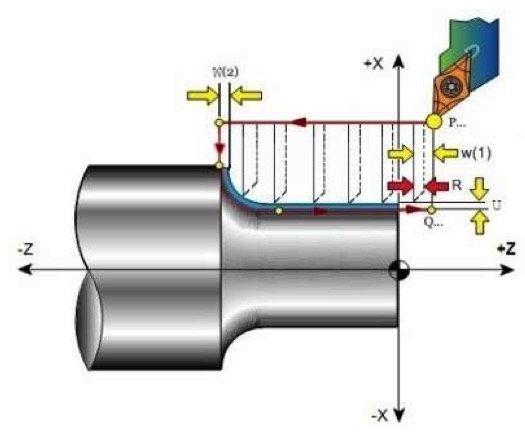
G72 W(1) … R…
G72 P… Q… U…W(2)…F…
W(1): Depth of cut on the facing side for each pass
R: Retraction amount after each pass
P: Sequence number of the first block of the finishing profile
Q: Sequence number of the last block of the finishing profile
U: Finishing allowance on diameter
W(2): Finishing allowance on the facing side
F: Cutting feed rate during the cycle
G70 – FINISHING PASS CYCLE
It’s used to remove the finishing allowance left behind by the G71 – G72 – G73 cycles.

G70 P… Q…
P: Sequence number of the first block of the finishing profile
Q: Sequence number of the last block of the finishing profile
G70 Example Programming
N010 G28 U0 W0
N020 G50 S2000
N030 G54
N040 T0101 (roughing tool)
N050 G96 S140 M04 M08
N060 G00 X42 Z05
N070 G72 W3 R0.5
N080 G72 P90 Q180 U0.3 W0.15 F0.4
N090 G00 X0
N100 G01 Z0 F0.2 (F value for G70)
N110 X16
N120 X20 Z-2
N130 Z-20
N140 G02 X30 Z-25 R5
N150 G01 Z-35
N160 X40
N170 Z-50
N180 X42
N190 G00 X200 Z200
N200 T0202 (finishing tool)
N210 S90 M04 M08
N220 G00 X42 Z5
N230 G70 P90 Q180
N240 G28 U0W0
N250 M05 M09
N260 M30Face Squaring
The facing cycle squares off the part’s end face, creating a reference surface for subsequent operations.
Radial Feed Direction
In the G94 cycle, the tool feeds radially, either toward or away from the center of the part.
G72 Roughing Efficiency
The G72 cycle lets you carry out roughing on the facing side with just a few lines of program code.
Related Questions
While the G90 command performs a longitudinal turning cycle (along the X axis), the G94 command performs a facing cycle (along the Z axis, perpendicular to the surface of the part). Both are modal commands, but they define motion on different axes.
Since G94 is a modal command, the program remembers the other parameters, like X and F, that have already been defined. The operator can start a new pass just by updating the Z value, which sets the depth, simplifying the program.
Related Posts
 What the Keys on the CNC Milling Control Panel Mean
 Fanuc CNC Error Codes – Fanuc Fault Codes
 CNC Lathe Setup Instructions
 What Is iMachining, Advanced CAD/CAM CNC Machining Technology
 G01 Code. Linear Motion with Cutting
 G75 CNC Grooving Cycle Code Explained
 G00 Rapid Positioning Without Cutting CNC Code
 The World’s Most Modern CNC Machines Video Series