Close Menu
  • MAKİNELER ve İMALAT
    • Tools & Equipment
    • Computer-Aided Drawing
    • CAD/CAM Education
    • CNC Machine Programming
    • Casting Technologies
    • Electrical & Electronics Technologies
    • Hydraulics & Pneumatics
    • Manufacturing Processes
    • Manufacturing Technologies
    • Occupational Safety
    • Mold & Die Design
    • Solid Modeling
    • Welding Technology
    • Machine Elements
    • Mechanical Trade Drawing
    • Materials Science
    • Automotive & Vehicle Technologies
    • Robotics Technologies
    • Health Technologies
    • Defense & Aerospace Technologies
    • Descriptive Geometry
    • Technical Drawing
    • Software & Hardware Technologies
    • Innovative Manufacturing Methods
  • TEKNOLOJİ ve YAŞAM
    • OTOMOBİLLER ve TAŞIT
      • Vehicle & Engine Knowledge
      • Safe Driving
      • Sürüş Destek Sistemleri
    • Genel Kültür
      • Movies & TV Shows
      • Görsel ve Grafik Sanat
      • Books & Literature
      • Music
      • Sports
      • History
      • History of Technology
    • GÜNDELİK YAŞAM TEKNOLOJİLERİ
    • Hobbies & Entertainment
    • Internet Technologies
    • Health
    • Mobile Technologies
Makine Eğitimi
  • Machines & Manufacturing
    Machine Elements
    Hydraulics & Pneumatics
    Technical Drawing
    Computer-Aided Design & Manufacturing
    Basic Manufacturing Processes
    Manufacturing Processes
    Industry Technologies
    Other Technical Courses
    Motion & Power Transmission
    Simple Machines
    Chains & Sprockets
    Shafts & Journals
    Gears
    Cams
    Couplings
    Belts & Pulleys
    Springs
    Bearings
    Keys
    Fastening Joining
    Retaining Rings
    Screws, Bolts & Nuts
    Cotter Pins
    Flanges
    Welding
    Rivets
    Pins & Bolts
    Washers
    Calculators
    Gear Ratio Calculator
    Spring Constant Calculator
    Belt Pulley Ratio Calculator
    Other Machine Elements
    Slides & Linear Guides
    Brakes
    Flywheels
    Clamps
    Shock Absorbers
    Gaskets & O-Rings
    Seals & Sealing Elements
    Hydraulics
    Introduction to Hydraulics & Principles
    Hydraulic Systems & Applications
    Accumulators
    Filters
    Motors
    Pumps
    Valves
    Pneumatics
    Introduction to Pneumatics & Principles
    Pneumatic Systems & Applications
    Pneumatic Circuit Components
    Valves
    Cylinders
    Silencers
    Motors
    Compressors
    Dryers
    Conditioning Units
    Common Topics & Maintenance
    Hydraulic & Pneumatic Maintenance
    Study Notes, Exams & Tests
    Technical Drawing
    Introduction to Technical Drawing
    Geometric Drawings
    Perspective & Projection
    Orthographic Views
    Dimensioning
    Sectioning
    Assembly & Detail Drawings
    Tolerances
    Surface Finish Symbols
    Mechanical Engineering Drawing
    Screws, Bolts & Nuts
    Pulley Drawings
    Gear Drawings
    Shafts & Journals
    Bearing Drawings
    Pins & Bolts
    Spring Drawings
    Welds in Technical Drawing
    Washers
    Cotter Pins
    Technical Drawing Exercises
    Mechanical Drawing Exercises
    Gear Exercises
    View Extraction Exercises
    Pulley Exercises
    Pin & Bolt Exercises
    Threaded Fastening Exercises
    Descriptive Geometry
    Computer-Aided Drawing
    AutoCAD Drawing Lessons
    Solid Modeling & Animation
    Solid Model Drawing Files
    Solid Model Assembly Examples
    Solid Model Drawing Lessons
    3D CAD Software Reviews
    Solid Modeling Exercises
    CNC Programming
    CAM
    Measurement & Inspection
    Dial Indicators
    Calipers
    Gauges
    Micrometers
    Materials Science
    Steels
    Cast Iron
    Aluminum
    Plastics
    Material Testing & Hardness Measurement
    Occupational Safety
    Workshop Safety
    Safety When Working With Electricity
    Machine Safety Rules
    Hand Operations
    Filing
    Marking
    Cutting Operations
    Reaming
    Tapping
    Threading With a Die
    Drill Bit Sharpening
    Working With Machines
    Basic Turning Operations
    Basic Milling Operations
    Shaper Machine
    Machining
    Turning
    Milling
    Grinding
    Innovative Manufacturing Methods
    EDM (Electrical Discharge Machining)
    Laser Machining
    Waterjet Machining
    3D Printing
    3D Scanners
    Welding
    Rolling
    Casting
    Mold & Die Design
    Mechanical & Hydraulic Presses
    Blanking & Piercing Dies
    Bending Dies
    Drawing Dies
    Plastic Injection Molds
    Extrusion Dies
    Compound Dies
    Progressive Dies
    Blow Molds
    Spinning Dies
    Spray Molds
    Manufacturing of Machine Parts
    Automotive & Vehicle Technologies
    Motor Vehicle Manufacturing
    Raw Material Production
    History of Technology
    Health & Medical Technologies
    Defense & Aerospace
    Robotics Technologies
    Software & Hardware Technologies
    Mechanics - Strength of Materials
    Physics Topics
  • Technology & Life
    Hobbies & Entertainment
    Sports
    Music
    Vehicle & Engine Knowledge
    Vehicle Maintenance & Repair
    Safe Driving
    Driver Assistance Systems
    History
    Movies & TV Shows
    Books & Literature
    Computers & Internet
    Computer Tips
    Software Reviews
    Hardware & Peripherals
    Practical & Safe Internet Use
    Visual & Graphic Art
    Mobile Technologies
    Travel
    Science
    Health
    First Aid Knowledge
    Everyday Technologies
Makine Eğitimi
Home»GÜNDELİK YAŞAM TEKNOLOJİLERİ»Automating Daily Routines with Smart Home Assistants
11 September 2026

Automating Daily Routines with Smart Home Assistants

Akıllı Ev Asistanları ile Günlük Rutinleri Otomatikleştirme

Switching on the lights one by one when the morning alarm goes off, checking the weather, adjusting the heating and trying to remember the day’s appointments adds up to a small but surprisingly costly drain on time and energy for most people. This is exactly where smart home assistants come in. With systems like Google Home and Amazon Alexa, a single command or a specific trigger can set dozens of actions running one after another.

  • What Is a Smart Home Assistant Routine?
  • Creating a Routine with Google Home
  • Creating a Routine with Alexa
  • Routine Examples That Actually Help in Daily Life
  • Things to Watch Out For
  • Recommended Videos
  • Frequently Asked Questions

In this article we look at what smart home assistant routines are for, how they are set up, and how much they really simplify daily life.

What Is a Smart Home Assistant Routine?

A routine is a type of automation that lets a single voice command or automatic trigger activate several smart devices or actions at once. Say “Hey Google, good morning” and the assistant can turn on the lights, read out the weather, remind you of your first meeting and summarise the news, all at the same time. Instead of issuing commands one by one, a pre-defined scenario takes over.

Routines can work in two ways. They can be triggered manually with a voice command, or they can start on their own based on an automatic condition such as a specific time, a change of location or a device’s status.

Creating a Routine with Google Home

To create a routine through the Google Home app, follow these steps:

Open the Google Home app and go to the “Routines” section from the home screen. From there you create a new routine and add at least one starter and one action. The starter is the event that triggers the routine. It can be a voice command, or a timing condition such as a specific hour or sunset. In the action section you define what happens: lights turning on, the thermostat being set, music playing or a reminder being read out.
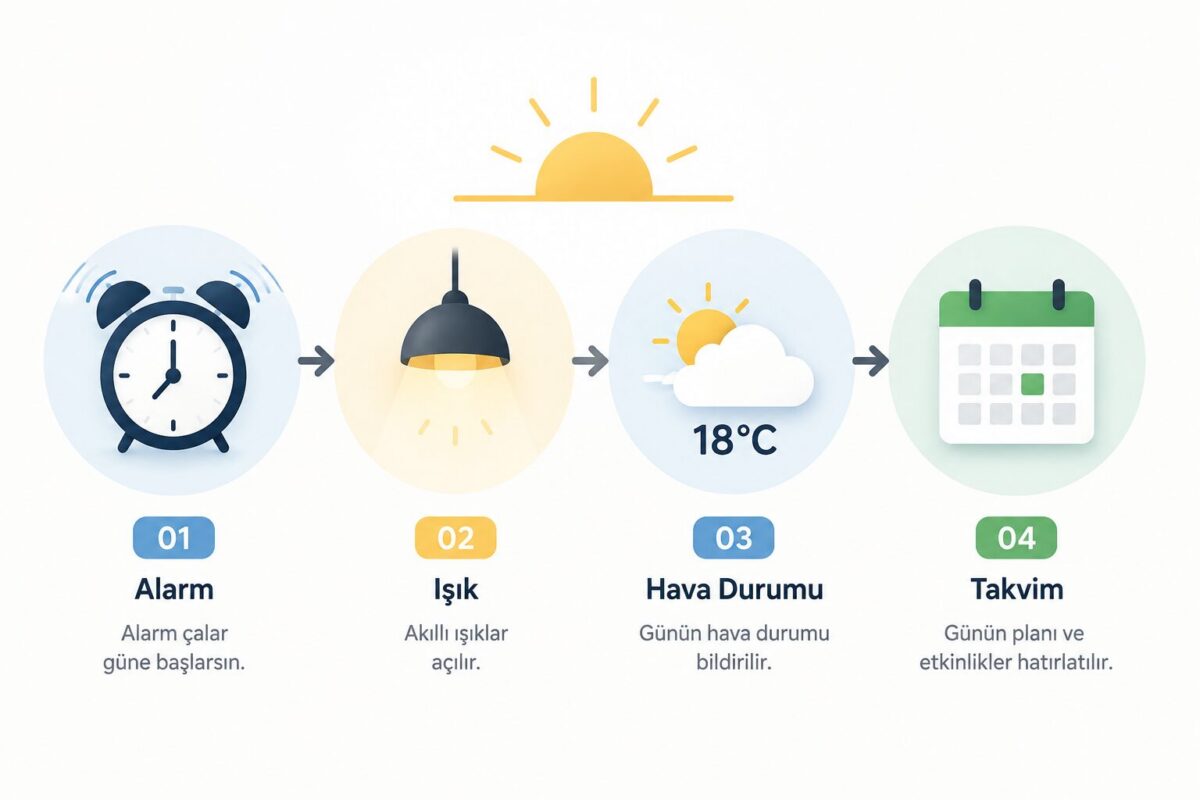
A simple infographic showing the flow of a morning routine

Google lets you customise the default routines that ship with the app, such as “Good morning” or “Good night”, but it also lets you delete those presets entirely and work only with your own custom routines. That is a practical option if you want to keep your automation list tidy.

Creating a Routine with Alexa

The logic works much the same way on the Amazon Alexa side. In the Alexa app you go to “Routines” from the “More” menu and add a new routine. Here too you define a trigger (voice command, time of day, device status) and one or more actions tied to it.
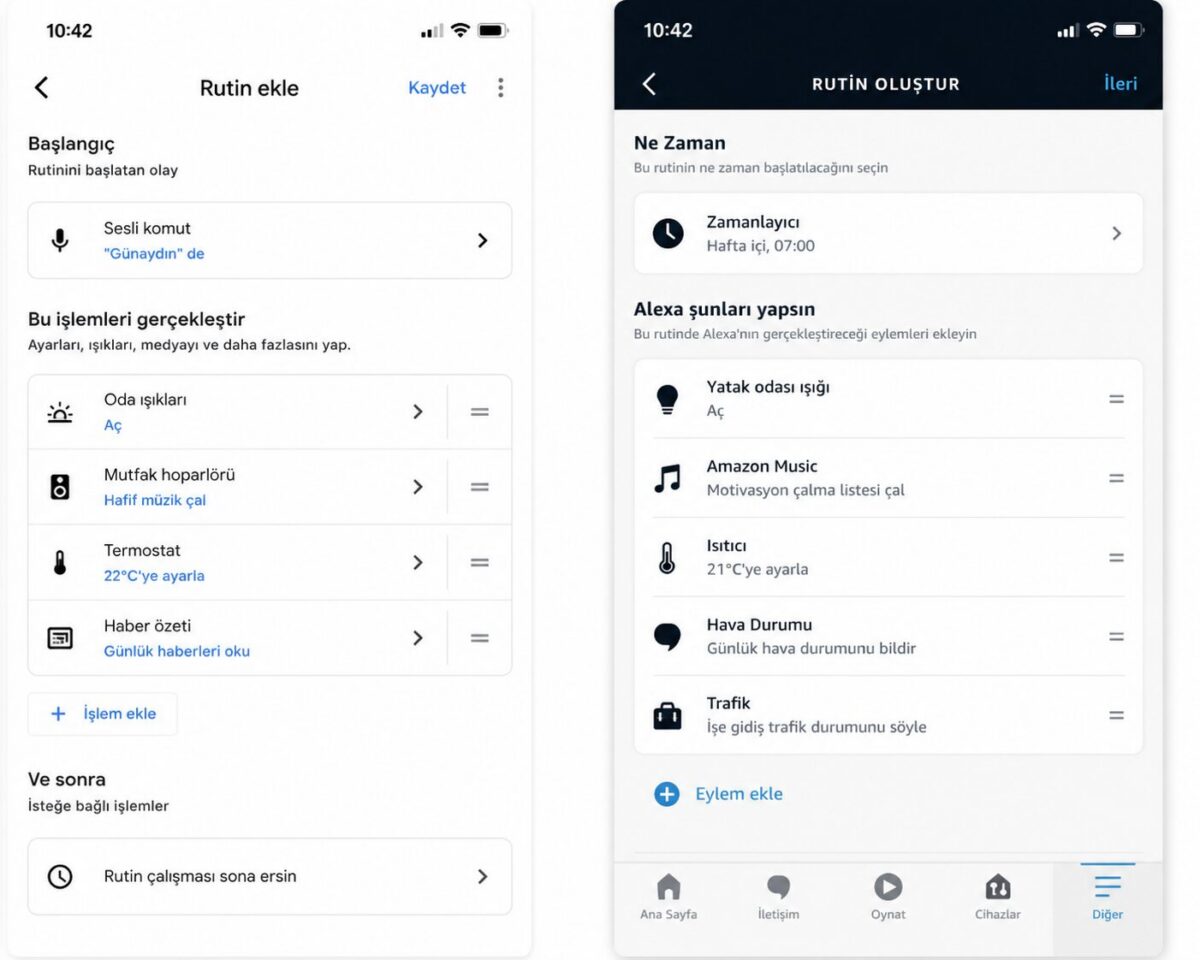
Google Home and Alexa routine creation screens

One of Alexa’s strengths is that it can combine devices from different brands, such as smart plugs, bulbs and thermostats, inside a single routine. For example, a location-based trigger can turn the lights on as you walk in the door and play a summary of your day at the same time.

Routine Examples That Actually Help in Daily Life

The scenarios that pay off most when setting up smart home assistant routines usually revolve around repeating daily habits.

A morning routine can slowly bring the lights up when you dismiss your alarm and read out the weather and traffic. An evening routine can switch the lights on automatically when you get home and set the thermostat.
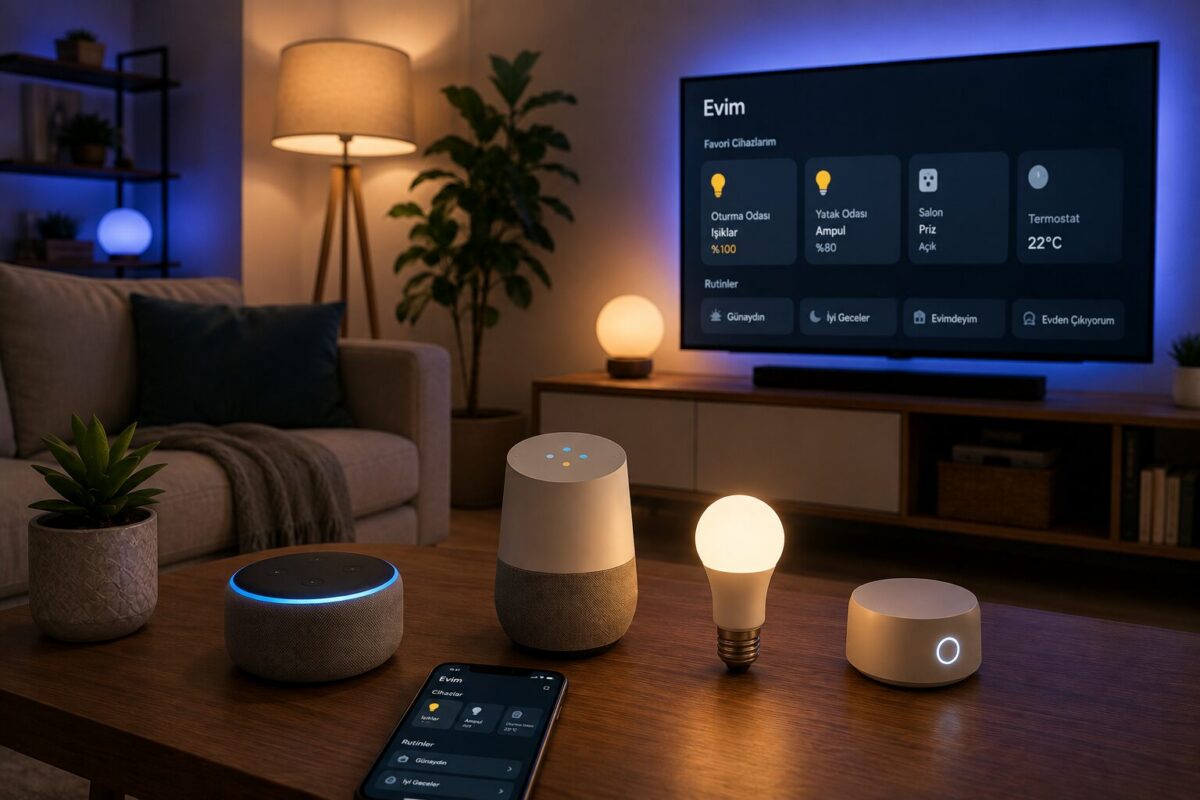
An indoor composition featuring devices such as a smart speaker and a smart bulb together

A bedtime routine can turn off every light, check the door locks and arm the alarm with one command. An “away routine” that shuts down all devices as you leave the house is also genuinely useful in terms of energy saving.

Things to Watch Out For

Routines are convenient, but a few points deserve attention. First, be cautious about tying security-critical actions such as unlocking a door into a routine, because a malfunction can have unexpected consequences. Also, if more than one person lives in the household, remember that the routines you create can be seen and changed by the other members of the home.

Recommended Videos

Google Home Ayarları | Rutinlerin Açılması

Google Home Ayarları | Rutinlerin Açılması

How to Setup and Customize Google Home Routines

How to Setup and Customize Google Home Routines

Create Custom Routines for Google Home

Create Custom Routines for Google Home

Frequently Asked Questions

No, each routine system works within its own ecosystem. Some third-party devices, however, can be compatible with both platforms.

Yes. Most routines run in the cloud, so an uninterrupted internet connection is needed.

Once they are set up, routines can be triggered from a smart speaker or display without a phone. Setting them up and editing them, however, generally requires the app.

Many Wi-Fi or Zigbee based devices with Google Home and Alexa compatibility, including smart bulbs, plugs, thermostats, locks and cameras, can be added to routines.

Related Posts
Robot Süpürgeler: Hangi Özellikler Gerçekten İşe Yarıyor, Hangileri Pazarlama Numarası Robot Vacuums: Which Features Really Work and Which Are Just Marketing Sesli Asistanlarla (Siri, Google Assistant) Hayatı Kolaylaştıran Az Bilinen Komutlar Lesser-Known Voice Assistant Commands That Make Life Easier (Siri, Google Assistant) Akıllı Priz ve Ampullerle Elektrik Faturasını Azaltma Yöntemleri Cutting Your Electricity Bill with Smart Plugs and Smart Bulbs Notion, Todoist Gibi Uygulamalarla Günlük Görev ve Not Yönetimi Managing Daily Tasks and Notes with Apps Like Notion and Todoist
Share. Facebook Twitter WhatsApp Tumblr Email Telegram Copy Link

Leave A Reply Cancel Reply

What Is a Clutch? How Does It Work? Failures and What Drivers Should Know
5 Tips for Cleaning Pet Hair
  • Contact
  • Terms of Service
  • Privacy & Cookie Policy

Type above and press Enter to search. Press Esc to cancel.