Close Menu
  • MAKİNELER ve İMALAT
    • Tools & Equipment
    • Computer-Aided Drawing
    • CAD/CAM Education
    • CNC Machine Programming
    • Casting Technologies
    • Electrical & Electronics Technologies
    • Hydraulics & Pneumatics
    • Manufacturing Processes
    • Manufacturing Technologies
    • Occupational Safety
    • Mold & Die Design
    • Solid Modeling
    • Welding Technology
    • Machine Elements
    • Mechanical Trade Drawing
    • Materials Science
    • Automotive & Vehicle Technologies
    • Robotics Technologies
    • Health Technologies
    • Defense & Aerospace Technologies
    • Descriptive Geometry
    • Technical Drawing
    • Software & Hardware Technologies
    • Innovative Manufacturing Methods
  • TEKNOLOJİ ve YAŞAM
    • OTOMOBİLLER ve TAŞIT
      • Vehicle & Engine Knowledge
      • Safe Driving
      • Sürüş Destek Sistemleri
    • Genel Kültür
      • Movies & TV Shows
      • Görsel ve Grafik Sanat
      • Books & Literature
      • Music
      • Sports
      • History
      • History of Technology
    • GÜNDELİK YAŞAM TEKNOLOJİLERİ
    • Hobbies & Entertainment
    • Internet Technologies
    • Health
    • Mobile Technologies
Makine Eğitimi
  • Machines & Manufacturing
    Machine Elements
    Hydraulics & Pneumatics
    Technical Drawing
    Computer-Aided Design & Manufacturing
    Basic Manufacturing Processes
    Manufacturing Processes
    Industry Technologies
    Other Technical Courses
    Motion & Power Transmission
    Simple Machines
    Chains & Sprockets
    Shafts & Journals
    Gears
    Cams
    Couplings
    Belts & Pulleys
    Springs
    Bearings
    Keys
    Fastening Joining
    Retaining Rings
    Screws, Bolts & Nuts
    Cotter Pins
    Flanges
    Welding
    Rivets
    Pins & Bolts
    Washers
    Calculators
    Gear Ratio Calculator
    Spring Constant Calculator
    Belt Pulley Ratio Calculator
    Other Machine Elements
    Slides & Linear Guides
    Brakes
    Flywheels
    Clamps
    Shock Absorbers
    Gaskets & O-Rings
    Seals & Sealing Elements
    Hydraulics
    Introduction to Hydraulics & Principles
    Hydraulic Systems & Applications
    Accumulators
    Filters
    Motors
    Pumps
    Valves
    Pneumatics
    Introduction to Pneumatics & Principles
    Pneumatic Systems & Applications
    Pneumatic Circuit Components
    Valves
    Cylinders
    Silencers
    Motors
    Compressors
    Dryers
    Conditioning Units
    Common Topics & Maintenance
    Hydraulic & Pneumatic Maintenance
    Study Notes, Exams & Tests
    Technical Drawing
    Introduction to Technical Drawing
    Geometric Drawings
    Perspective & Projection
    Orthographic Views
    Dimensioning
    Sectioning
    Assembly & Detail Drawings
    Tolerances
    Surface Finish Symbols
    Mechanical Engineering Drawing
    Screws, Bolts & Nuts
    Pulley Drawings
    Gear Drawings
    Shafts & Journals
    Bearing Drawings
    Pins & Bolts
    Spring Drawings
    Welds in Technical Drawing
    Washers
    Cotter Pins
    Technical Drawing Exercises
    Mechanical Drawing Exercises
    Gear Exercises
    View Extraction Exercises
    Pulley Exercises
    Pin & Bolt Exercises
    Threaded Fastening Exercises
    Descriptive Geometry
    Computer-Aided Drawing
    AutoCAD Drawing Lessons
    Solid Modeling & Animation
    Solid Model Drawing Files
    Solid Model Assembly Examples
    Solid Model Drawing Lessons
    3D CAD Software Reviews
    Solid Modeling Exercises
    CNC Programming
    CAM
    Measurement & Inspection
    Dial Indicators
    Calipers
    Gauges
    Micrometers
    Materials Science
    Steels
    Cast Iron
    Aluminum
    Plastics
    Material Testing & Hardness Measurement
    Occupational Safety
    Workshop Safety
    Safety When Working With Electricity
    Machine Safety Rules
    Hand Operations
    Filing
    Marking
    Cutting Operations
    Reaming
    Tapping
    Threading With a Die
    Drill Bit Sharpening
    Working With Machines
    Basic Turning Operations
    Basic Milling Operations
    Shaper Machine
    Machining
    Turning
    Milling
    Grinding
    Innovative Manufacturing Methods
    EDM (Electrical Discharge Machining)
    Laser Machining
    Waterjet Machining
    3D Printing
    3D Scanners
    Welding
    Rolling
    Casting
    Mold & Die Design
    Mechanical & Hydraulic Presses
    Blanking & Piercing Dies
    Bending Dies
    Drawing Dies
    Plastic Injection Molds
    Extrusion Dies
    Compound Dies
    Progressive Dies
    Blow Molds
    Spinning Dies
    Spray Molds
    Manufacturing of Machine Parts
    Automotive & Vehicle Technologies
    Motor Vehicle Manufacturing
    Raw Material Production
    History of Technology
    Health & Medical Technologies
    Defense & Aerospace
    Robotics Technologies
    Software & Hardware Technologies
    Mechanics - Strength of Materials
    Physics Topics
  • Technology & Life
    Hobbies & Entertainment
    Sports
    Music
    Vehicle & Engine Knowledge
    Vehicle Maintenance & Repair
    Safe Driving
    Driver Assistance Systems
    History
    Movies & TV Shows
    Books & Literature
    Computers & Internet
    Computer Tips
    Software Reviews
    Hardware & Peripherals
    Practical & Safe Internet Use
    Visual & Graphic Art
    Mobile Technologies
    Travel
    Science
    Health
    First Aid Knowledge
    Everyday Technologies
Makine Eğitimi
Home»GÜNDELİK YAŞAM TEKNOLOJİLERİ»Managing Daily Tasks and Notes with Apps Like Notion and Todoist
11 September 2026

Managing Daily Tasks and Notes with Apps Like Notion and Todoist

Notion, Todoist Gibi Uygulamalarla Günlük Görev ve Not Yönetimi

A to-do list you try to keep in your head usually ends in forgotten jobs and last-minute panic. Apps like Notion and Todoist aim to gather that clutter in one place and make daily life more organised. They do not, however, do the same job. In this article we look at what each app is for, how they differ, how they are priced and how they can be used day to day.

  • What Is Todoist and Who Is It For?
  • What Is Notion and Who Is It For?
  • Pricing Comparison
  • The Fundamental Difference Between the Two Apps
  • Integrations
  • Practical Everyday Use Cases
  • Which App Should You Start With?
  • Frequently Asked Questions

What Is Todoist and Who Is It For?

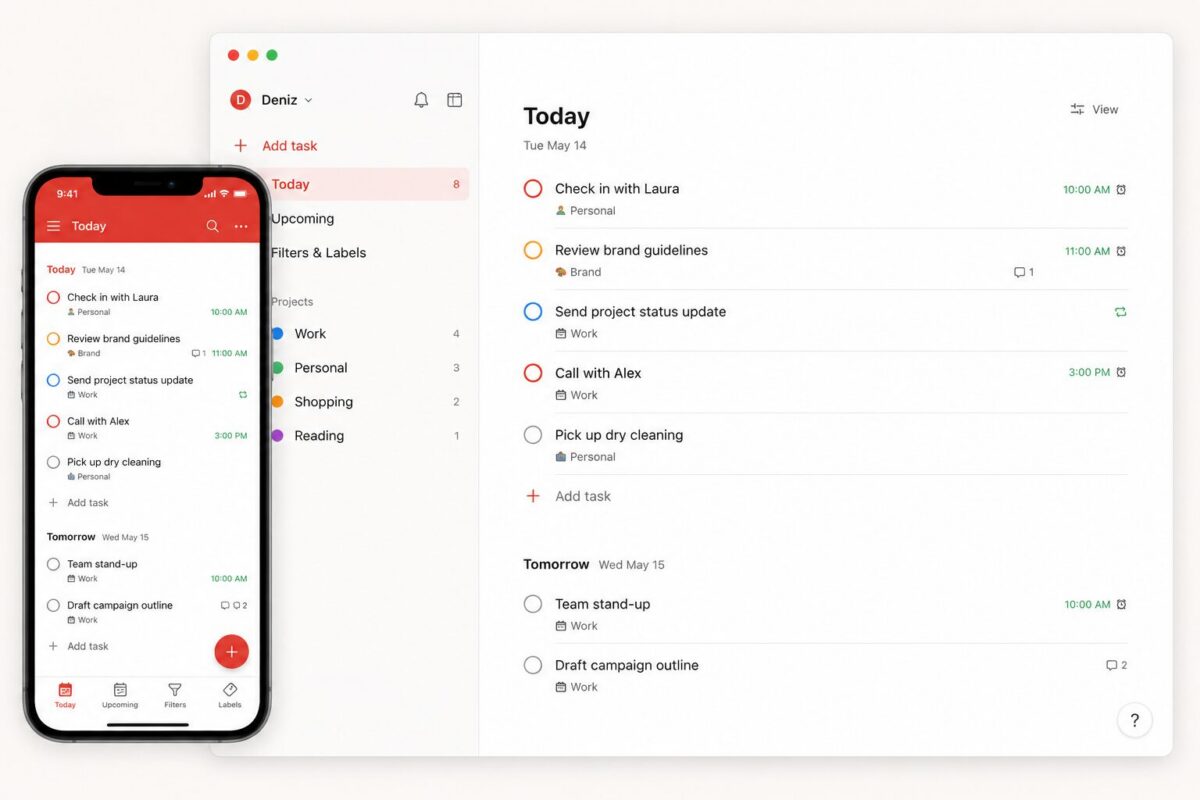
Todoist is a clean, focused task management app. The interface is uncluttered, and writing a task and adding a date, priority level and label takes a couple of seconds. Thanks to natural language input, typing “meeting tomorrow at 3pm” is enough; the app converts it into a date and time automatically.

Todoist’s strength is that it offers a four-level hierarchy (project, section, task, subtask), priority levels and more than a hundred custom filter views. A voice feature called Ramble can automatically turn a messy stream of spoken ideas into tidy tasks, and it supports a large number of languages.
todoist task list
A view of Todoist’s daily task list screen

In return, Todoist deliberately stays limited. It offers no complex project management tools such as Gantt charts, dependencies between tasks or a document layer. That makes it ideal for people who want simple task tracking, and inadequate for work that requires complex project coordination.
synchronised working on phone and computer
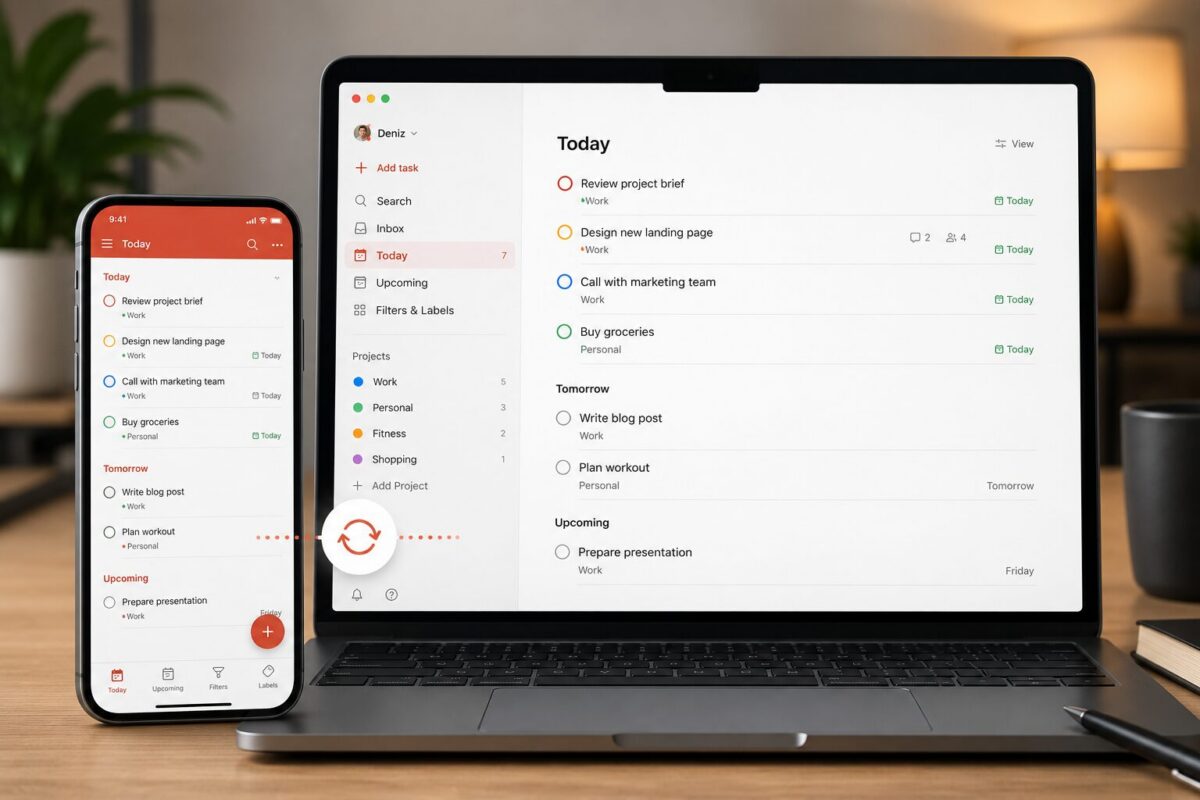
Synchronisation across phone and computer screens

What Is Notion and Who Is It For?

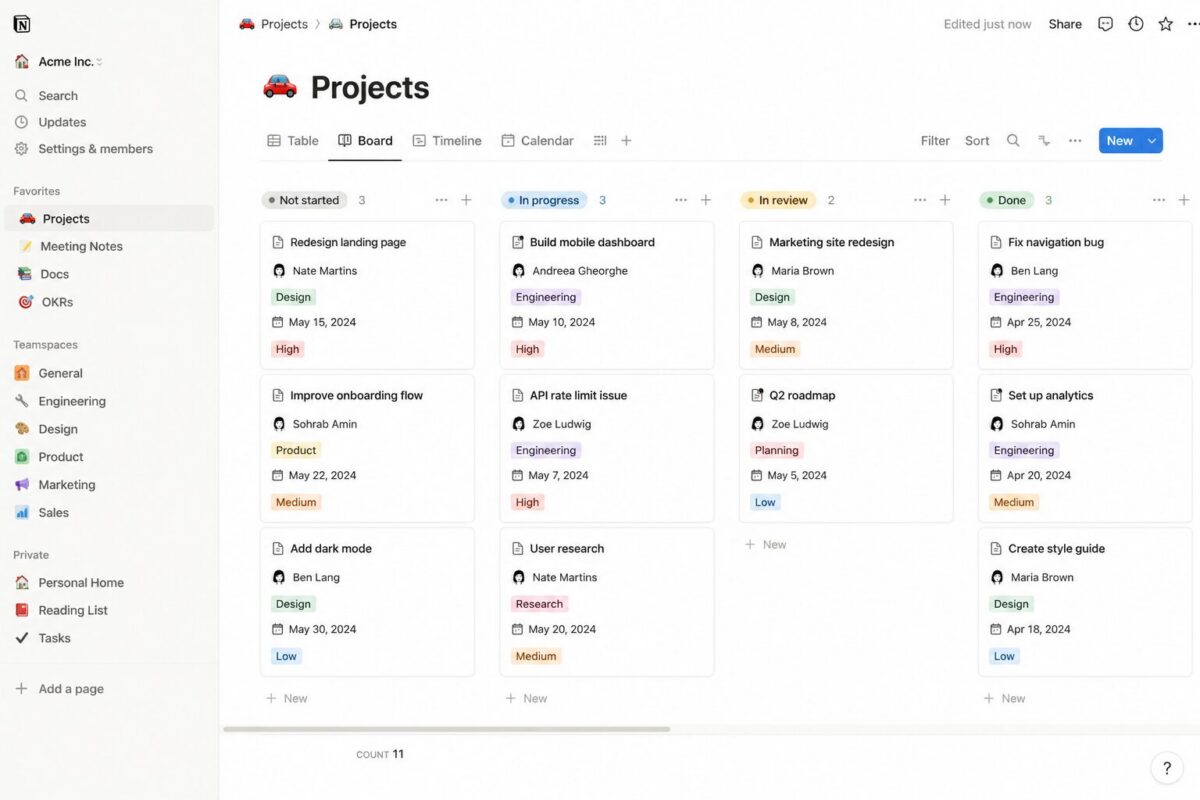
Notion is far more than a task manager. Notes, databases, projects, journals and tasks can all be brought together in the same workspace. Being able to drop a table, calendar, kanban board or a simple block of text into a page makes Notion flexible, but also makes it a tool that takes a little longer to set up.
notion kanban board

Notion’s AI features have expanded noticeably in recent times. Writing text inside a page, summarising it and pulling action items out of meeting notes can all be done through the AI assistant.

Some of those features are billed on a credit basis, however, which can make costs harder to predict under heavy use. Performance can also drop on very large databases (thousands of records), which makes Notion a more comfortable choice for small and medium-sized personal use.

Pricing Comparison

Todoist’s free plan is limited to five active projects, and some features such as reminders and labels come with the paid plans. The Pro plan is roughly 4-5 dollars a month, and the Business plan around 6-8 dollars per user per month.
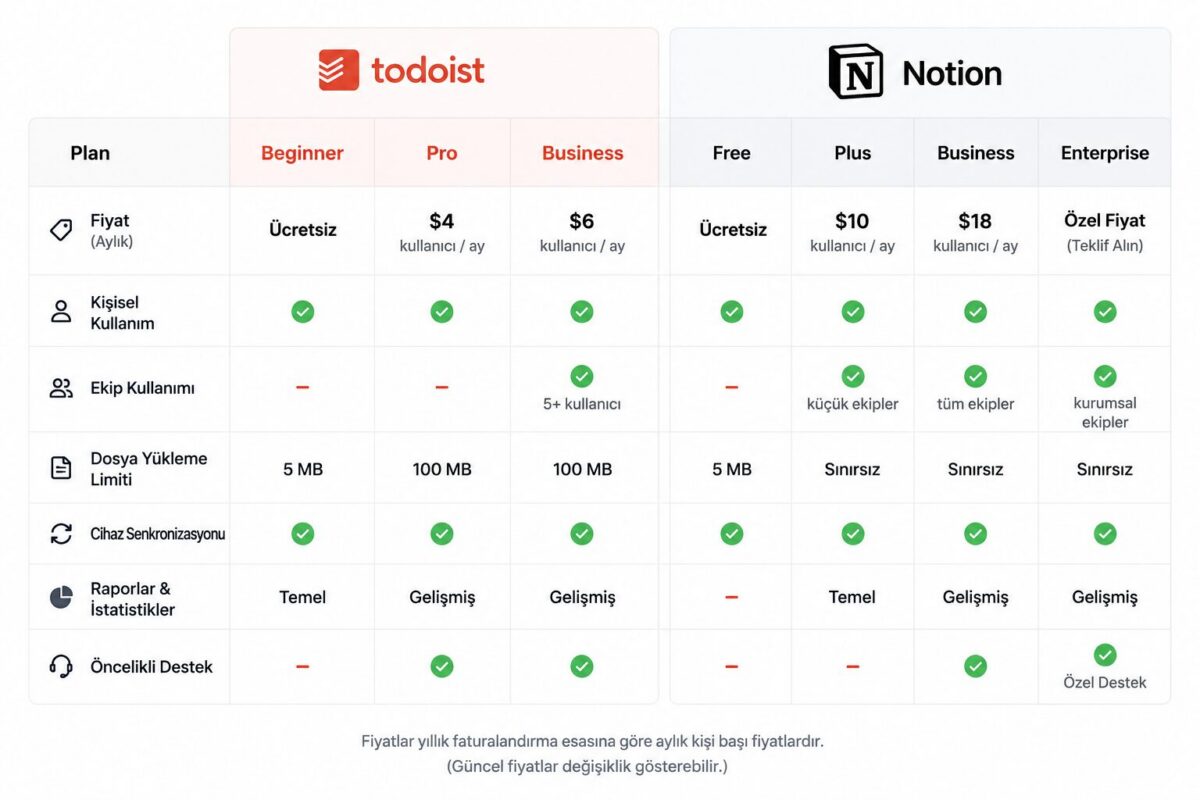
a table comparing Todoist and Notion pricing plans
Todoist and Notion pricing comparison as of September 2026

Notion’s free plan offers a fairly generous amount of room for personal use, but the AI features are billed separately. For team use and advanced features, paid plans range from 0 to 20 dollars per user per month.

The Fundamental Difference Between the Two Apps

Todoist works like a task list; Notion works like a workspace. Adding a task in Todoist takes three seconds, whereas in Notion the same job may first require setting up a database or page structure.

That is why people who want fast, simple task tracking gravitate towards Todoist, while those who want to organise their notes and projects visually go to Notion. Some users prefer to use both together: Todoist for daily tasks, Notion for long-term project and note management.

Integrations

Todoist integrates with more than eighty third-party tools, including Google Calendar, Outlook, Gmail, Slack and voice assistants, and it can even be connected to Notion. Notion, thanks to its open API, connects easily to automation tools and can allow various AI tools direct access to the workspace. In everyday use, calendar synchronisation is the most popular integration for both apps.

Practical Everyday Use Cases

Seeing the day’s tasks in a single list as part of a morning routine, turning repeating lists such as grocery shopping into templates, and adding household bill due dates as reminders are among the most common uses of these apps. On the Notion side, more comprehensive setups such as a month’s reading list, household budget tracking or travel planning can be kept on a single page.

Which App Should You Start With?

For short to-do lists, reminders and simple recurring tasks, starting with Todoist wastes less of your time. For anyone who wants to manage notes, projects and tasks together, starting with one of Notion’s ready-made templates is a more practical route than building a system from scratch.

Notion Nedir, Nasıl Kullanılır, Kullanım Alanları Nelerdir? | Notion Eğitim Seti 1 |
Notion Nedir, Nasıl Kullanılır, Kullanım Alanları Nelerdir? | Notion Eğitim Seti 1 |

Notion'da Basit Yapılacaklar (To-Do) Listesi Oluşturmak
Notion'da Basit Yapılacaklar (To-Do) Listesi Oluşturmak

Todoist Nedir, Nasıl Kullanılır

Todoist Nedir, Nasıl Kullanılır

Frequently Asked Questions

Both have a free plan. Todoist’s free plan is limited to five projects, while Notion’s free plan offers more room for personal use. Advanced features and AI tools generally come with paid plans or at extra cost.

Todoist is quicker to learn because it is an app focused on a single purpose. Notion’s flexibility takes a little more time and experimentation on first use.

Yes. Many users run Todoist for daily tasks and Notion for long-term project and note organisation, and the two apps can even be integrated with each other.

Yes. Both apps sync automatically across all devices, and a change made on one device appears on the others instantly.

Related Posts

Sesli Asistanlarla (Siri, Google Assistant) Hayatı Kolaylaştıran Az Bilinen Komutlar Lesser-Known Voice Assistant Commands That Make Life Easier (Siri, Google Assistant) Robot Süpürgeler: Hangi Özellikler Gerçekten İşe Yarıyor, Hangileri Pazarlama Numarası Robot Vacuums: Which Features Really Work and Which Are Just Marketing Akıllı Ev Asistanları ile Günlük Rutinleri Otomatikleştirme Automating Daily Routines with Smart Home Assistants Akıllı Priz ve Ampullerle Elektrik Faturasını Azaltma Yöntemleri Cutting Your Electricity Bill with Smart Plugs and Smart Bulbs
Software Reviews
Share. Facebook Twitter WhatsApp Tumblr Email Telegram Copy Link

Leave A Reply Cancel Reply

What Is a Panenka Penalty? The Best Panenka Penalties
Properties of Ethanol (Ethyl Alcohol) Blended Gasoline
  • Contact
  • Terms of Service
  • Privacy & Cookie Policy

Type above and press Enter to search. Press Esc to cancel.